AI Evals Must Be Task Oriented & Iterative
When building a Generative AI application, AI Evals is a good way to run water through the pipes

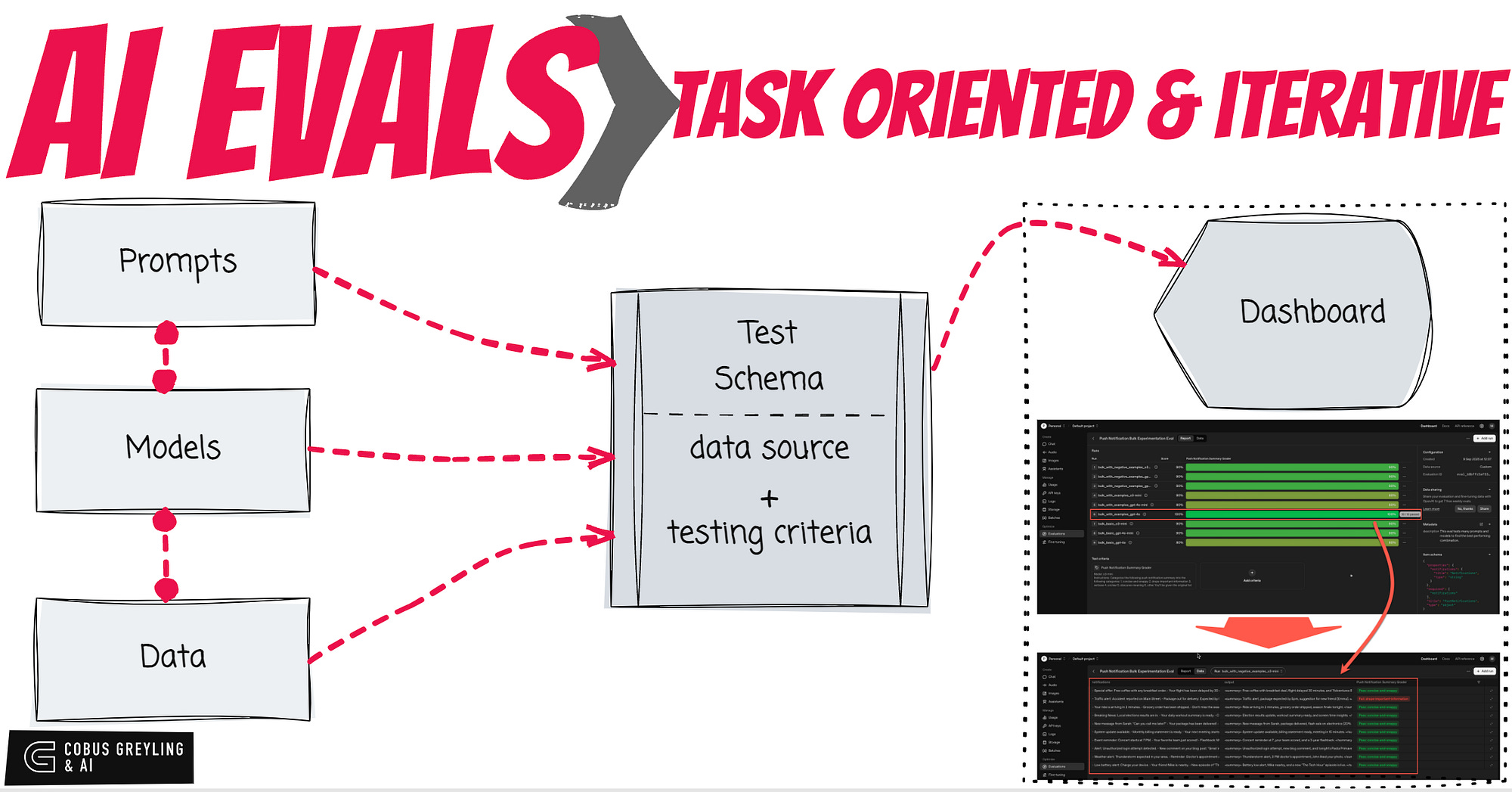
AI Evals systematically measures how well an AI application performs on specific tasks, catching regressions, without relying solely on gut-feel or manual spot-checks.
Firstly, the best way to understand AI Evaluations is to step through one of the many notebooks available.
I would argue that AI Evals in principle is a good way to test your GenAI application from end-to-end with varying models, prompts and test schemas.
The important inputs are prompts, models and data.
The evaluation compares a set of outcomes against a benchmark set of data.
The set of outcomes are generated based on a configuration of prompts, models and data.
In this AI Evals example, the idea is to test different prompts with different models, and see which st of outcomes are the closest to the benchmark.
Evals have two parts, the setup which holds the test schema and the evaluation data.
And then the routine which executes and captures the outputs.
What helps is if you have a tool that graphically displays the results. In the example below, I make use of the OpenAI dashboard for evaluations.
For effective AI Evaluations you will need to know what you are testing for, what is your expected input and expected output.
Here is a practical example you can run in a Colab Notebook…
First establish the foundational setup required for the rest of the script to interact with OpenAI’s services…
import pydantic
import openai
from openai.types.chat import ChatCompletion
import os

os.environ["OPENAI_API_KEY"] = os.environ.get("OPENAI_API_KEY", "Your API Key")
This code sets up a basic prompt for summarising push notifications and defines a function to call the OpenAI API for generating summaries using a specific model.
It includes an example usage to demonstrate how the function collapses multiple notifications into one, printing the result for verification.
DEVELOPER_PROMPT = """
You are a helpful assistant that summarizes push notifications.
You are given a list of push notifications and you need to collapse them into a single one.
Output only the final summary, nothing else.
"""

def summarize_push_notification(push_notifications: str) -> ChatCompletion:
    result = openai.chat.completions.create(
        model="gpt-4o-mini",
        messages=[
            {"role": "developer", "content": DEVELOPER_PROMPT},
            {"role": "user", "content": push_notifications},
        ],
    )
    return result

example_push_notifications_list = PushNotifications(notifications="""
- Alert: Unauthorized login attempt detected.
- New comment on your blog post: "Great insights!"
- Tonight's dinner recipe: Pasta Primavera.
""")
result = summarize_push_notification(example_push_notifications_list.notifications)
print(result.choices[0].message.content)
Unauthorized login attempt detected; also,
there's a new comment on your blog post and a reminder
for tonight's dinner recipe: Pasta Primavera.below, configure a custom data source for the evaluation, linking it to the PushNotifications model’s schema to ensure structured input.
It also specifies that sample schemas should be included, preparing for API completions in the bulk experimentation process.
# We want our input data to be available in our variables, so we set the item_schema to
# PushNotifications.model_json_schema()
data_source_config = {
    "type": "custom",
    "item_schema": PushNotifications.model_json_schema(),
    # We're going to be uploading completions from the API, so we tell the Eval to expect this
    "include_sample_schema": True,
}
Define a prompt and template for grading summarised push notifications…
GRADER_DEVELOPER_PROMPT = """
Categorize the following push notification summary into the following categories:
1. concise-and-snappy
2. drops-important-information
3. verbose
4. unclear
5. obscures-meaning
6. other

You'll be given the original list of push notifications and the summary like this:

<push_notifications>
...notificationlist...
</push_notifications>
<summary>
...summary...
</summary>

You should only pick one of the categories above, pick the one which most closely matches and why.
"""
GRADER_TEMPLATE_PROMPT = """
<push_notifications>{{item.notifications}}</push_notifications>
<summary>{{sample.output_text}}</summary>
"""
push_notification_grader = {
    "name": "Push Notification Summary Grader",
    "type": "label_model",
    "model": "o3-mini",
    "input": [
        {
            "role": "developer",
            "content": GRADER_DEVELOPER_PROMPT,
        },
        {
            "role": "user",
            "content": GRADER_TEMPLATE_PROMPT,
        },
    ],
    "passing_labels": ["concise-and-snappy"],
    "labels": [
        "concise-and-snappy",
        "drops-important-information",
        "verbose",
        "unclear",
        "obscures-meaning",
        "other",
    ],
}
Create an evaluation instance via the OpenAI Evals API, naming it and providing metadata for the bulk experimentation on push notification summaries.
eval_create_result = openai.evals.create(
    name="Push Notification Bulk Experimentation Eval",
    metadata={
        "description": "This eval tests many prompts and models to find the best performing combination.",
    },
    data_source_config=data_source_config,
    testing_criteria=[push_notification_grader],
)
eval_id = eval_create_result.id
List of sample push notification strings used as test data for the evaluation.
Each item represents a set of notifications to be summarised, providing diverse examples to assess model and prompt performance across bulk runs.
push_notification_data = [
        """
- New message from Sarah: "Can you call me later?"
- Your package has been delivered!
- Flash sale: 20% off electronics for the next 2 hours!
""",
        """
- Weather alert: Thunderstorm expected in your area.
- Reminder: Doctor's appointment at 3 PM.
- John liked your photo on Instagram.
""",
        """
- Breaking News: Local elections results are in.
- Your daily workout summary is ready.
- Check out your weekly screen time report.
""",
        """
- Your ride is arriving in 2 minutes.
- Grocery order has been shipped.
- Don't miss the season finale of your favorite show tonight!
""",
        """
- Event reminder: Concert starts at 7 PM.
- Your favorite team just scored!
- Flashback: Memories from 3 years ago.
""",
        """
- Low battery alert: Charge your device.
- Your friend Mike is nearby.
- New episode of "The Tech Hour" podcast is live!
""",
        """
- System update available.
- Monthly billing statement is ready.
- Your next meeting starts in 15 minutes.
""",
        """
- Alert: Unauthorized login attempt detected.
- New comment on your blog post: "Great insights!"
- Tonight's dinner recipe: Pasta Primavera.
""",
        """
- Special offer: Free coffee with any breakfast order.
- Your flight has been delayed by 30 minutes.
- New movie release: "Adventures Beyond" now streaming.
""",
        """
- Traffic alert: Accident reported on Main Street.
- Package out for delivery: Expected by 5 PM.
- New friend suggestion: Connect with Emma.
"""]
PROMPT_PREFIX = """
You are a helpful assistant that takes in an array of push notifications and returns a collapsed summary of them.
The push notification will be provided as follows:
<push_notifications>
...notificationlist...
</push_notifications>
You should return just the summary and nothing else.
"""
PROMPT_VARIATION_BASIC = f"""
{PROMPT_PREFIX}
You should return a summary that is concise and snappy.
"""
PROMPT_VARIATION_WITH_EXAMPLES = f"""
{PROMPT_VARIATION_BASIC}
Here is an example of a good summary:
<push_notifications>
- Traffic alert: Accident reported on Main Street.- Package out for delivery: Expected by 5 PM.- New friend suggestion: Connect with Emma.
</push_notifications>
<summary>
Traffic alert, package expected by 5pm, suggestion for new friend (Emily).
</summary>
"""
PROMPT_VARIATION_WITH_NEGATIVE_EXAMPLES = f"""
{PROMPT_VARIATION_WITH_EXAMPLES}
Here is an example of a bad summary:
<push_notifications>
- Traffic alert: Accident reported on Main Street.- Package out for delivery: Expected by 5 PM.- New friend suggestion: Connect with Emma.
</push_notifications>
<summary>
Traffic alert reported on main street. You have a package that will arrive by 5pm, Emily is a new friend suggested for you.
</summary>
"""
prompts = [
("basic", PROMPT_VARIATION_BASIC),
("with_examples", PROMPT_VARIATION_WITH_EXAMPLES),
("with_negative_examples", PROMPT_VARIATION_WITH_NEGATIVE_EXAMPLES),
]
models = ["gpt-4o", "gpt-4o-mini", "o3-mini"]This nested loop iterates over prompts and models to create bulk evaluation runs, configuring data sources for completions on the test data.
It generates reports for each combination, facilitating analysis of which prompt-model pair performs best in summarising notifications.
for prompt_name, prompt in prompts:
    for model in models:
        run_data_source = {
            "type": "completions",
            "input_messages": {
                "type": "template",
                "template": [
                    {
                        "role": "developer",
                        "content": prompt,
                    },
                    {
                        "role": "user",
                        "content": "<push_notifications>{{item.notifications}}</push_notifications>",
                    },
                ],
            },
            "model": model,
            "source": {
                "type": "file_content",
                "content": [
                    {
                        "item": PushNotifications(notifications=notification).model_dump()
                    }
                    for notification in push_notification_data
                ],
            },
        }

        run_create_result = openai.evals.runs.create(
            eval_id=eval_id,
            name=f"bulk_{prompt_name}_{model}",
            data_source=run_data_source,
        )
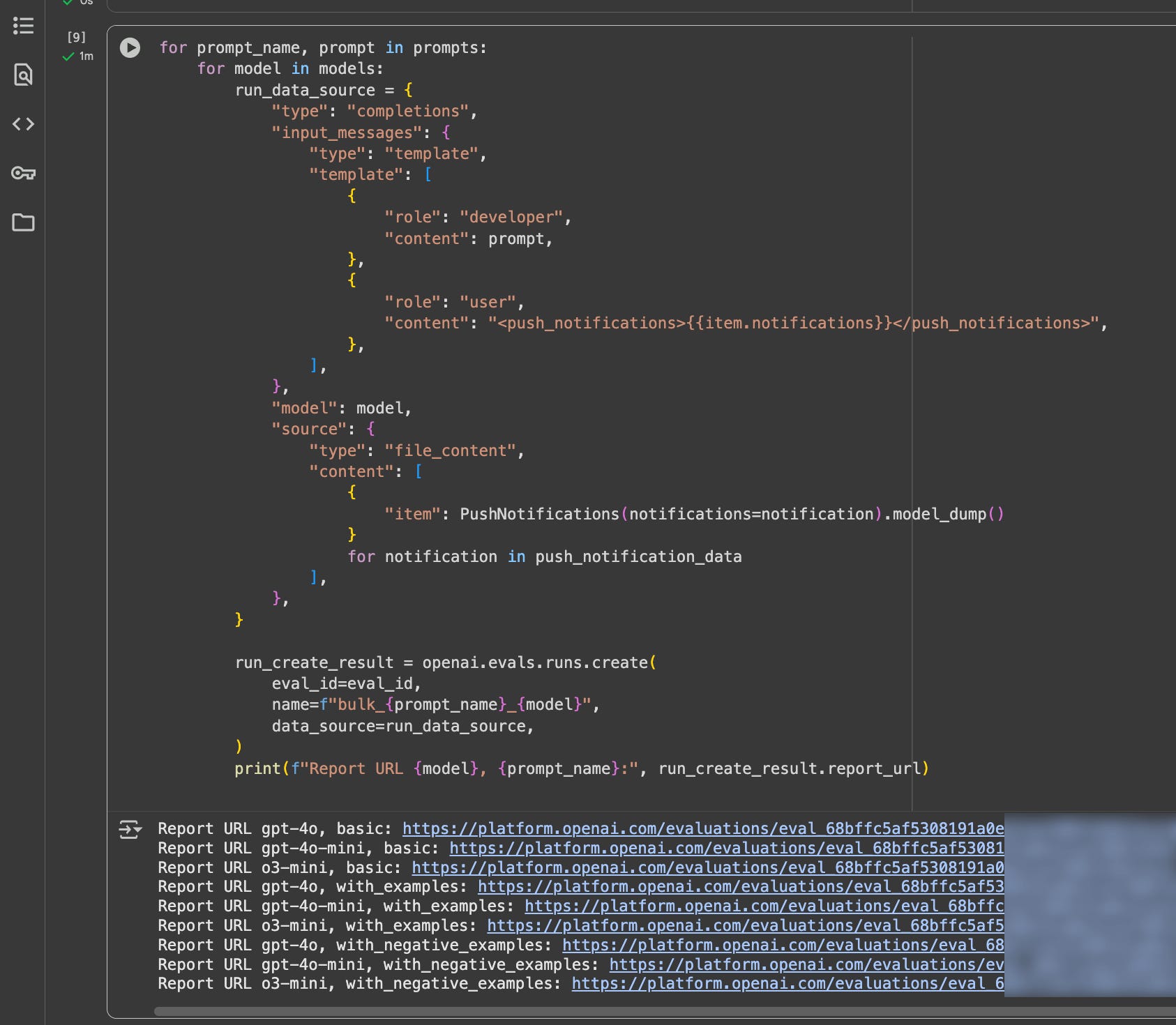
        print(f"Report URL {model}, {prompt_name}:", run_create_result.report_url)
And below the notebook fiew of teh model used, the prompt and a link to the evaluation.
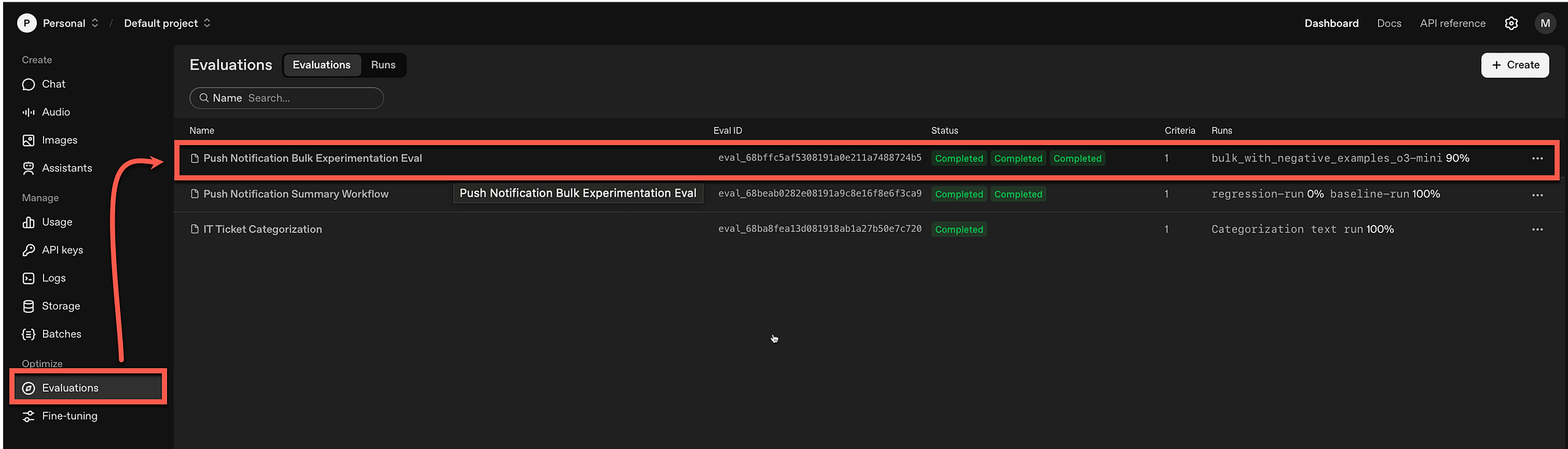
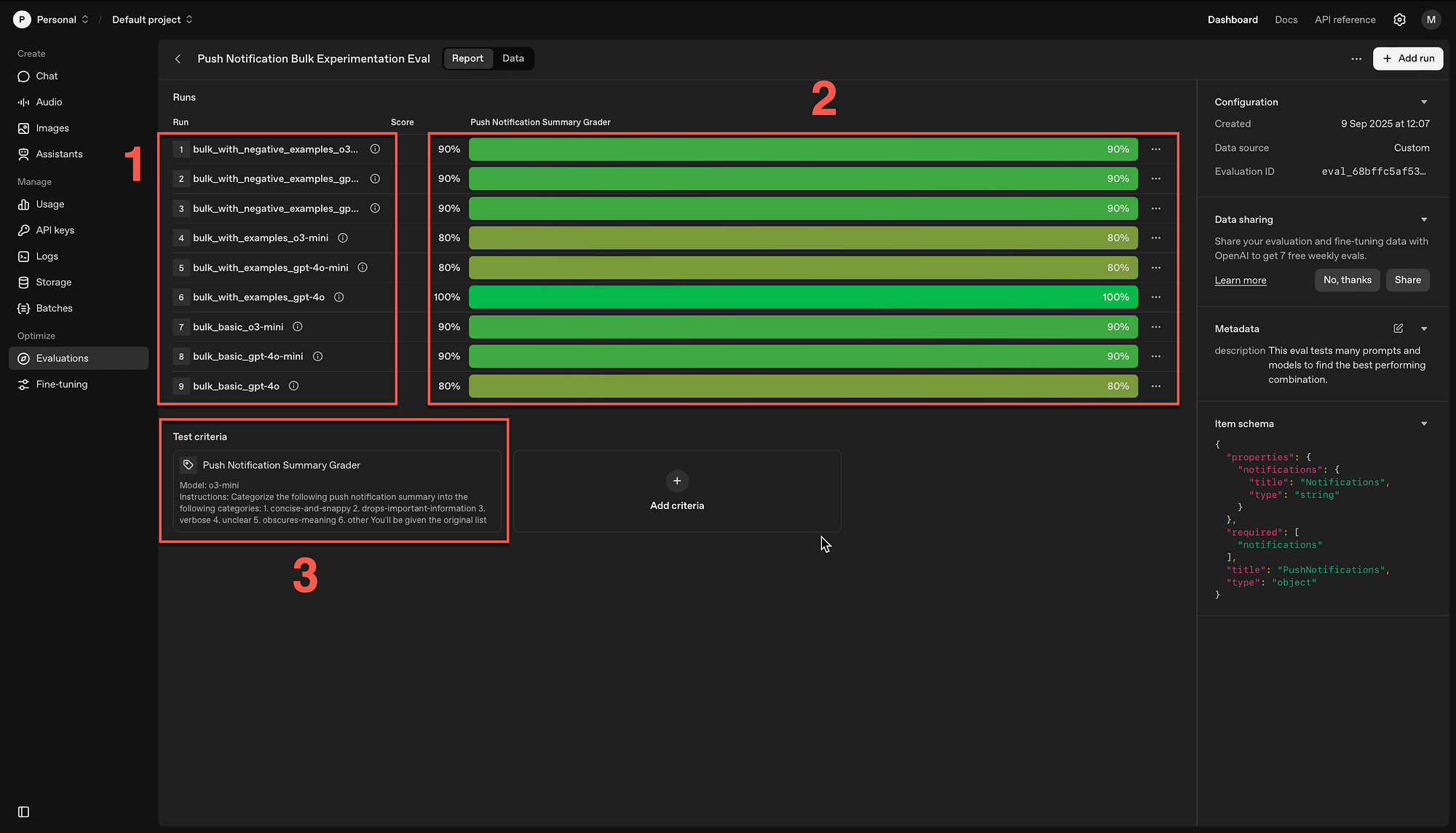
Within the OpenAI dashboard under Evaluations, the new evaluation is listed…
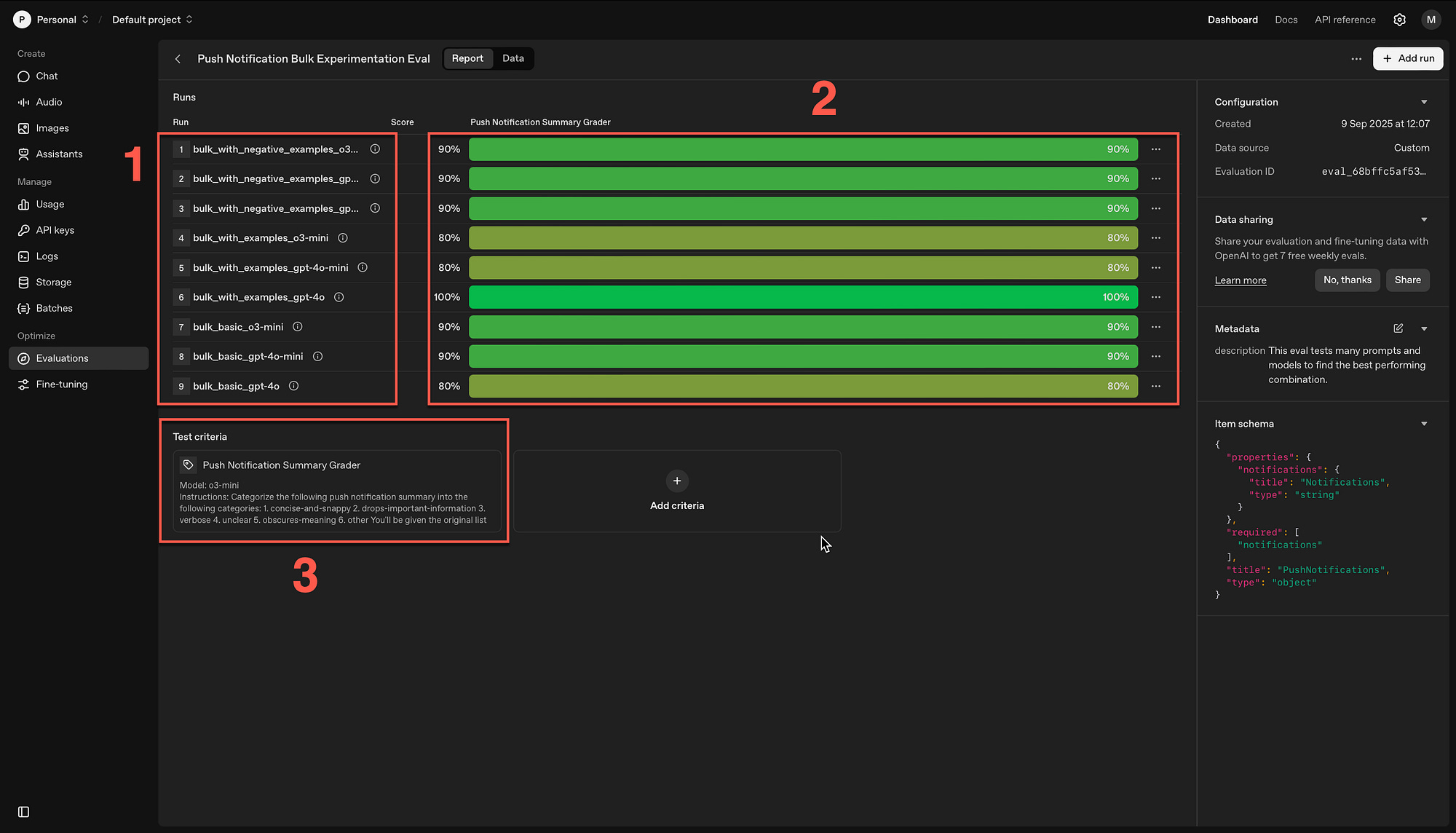
The nine runs are listed (1) with the grader scores (2) and the test criteria (3).
Here you can see that if you click on one of the runs, you can see the detail of the data sets and the reason it was successful or failed.
Chief Evangelist @ Kore.ai | I’m passionate about exploring the intersection of AI and language. Language Models, AI Agents, Agentic Apps, Dev Frameworks & Data-Driven Tools shaping tomorrow.