Claude Code Agent Teams
Getting Started with Claude Code Agent Teams

Some background…
Recently I tried to capture the ever shifting AI Agent architectures in one article.
But something I have realised is that it is getting harder to box AI Agent architectures into categories…
We have all become familiar with single ReAct agents, agentic workflows, supervisor and sub-agent architectures etc.
But it feels like Agent Teams from Anthropic is a new paradigm…which I would like to explore in this post…
Also, there is this notion of models moving up the stack…and functionality is offloaded to the model.
And it makes me wonder to what extent models will become so powerful that functionality will be absorbed by the model to a large degree…
And Agentic applications will become a collection of markdown files…
Claude Agent Teams
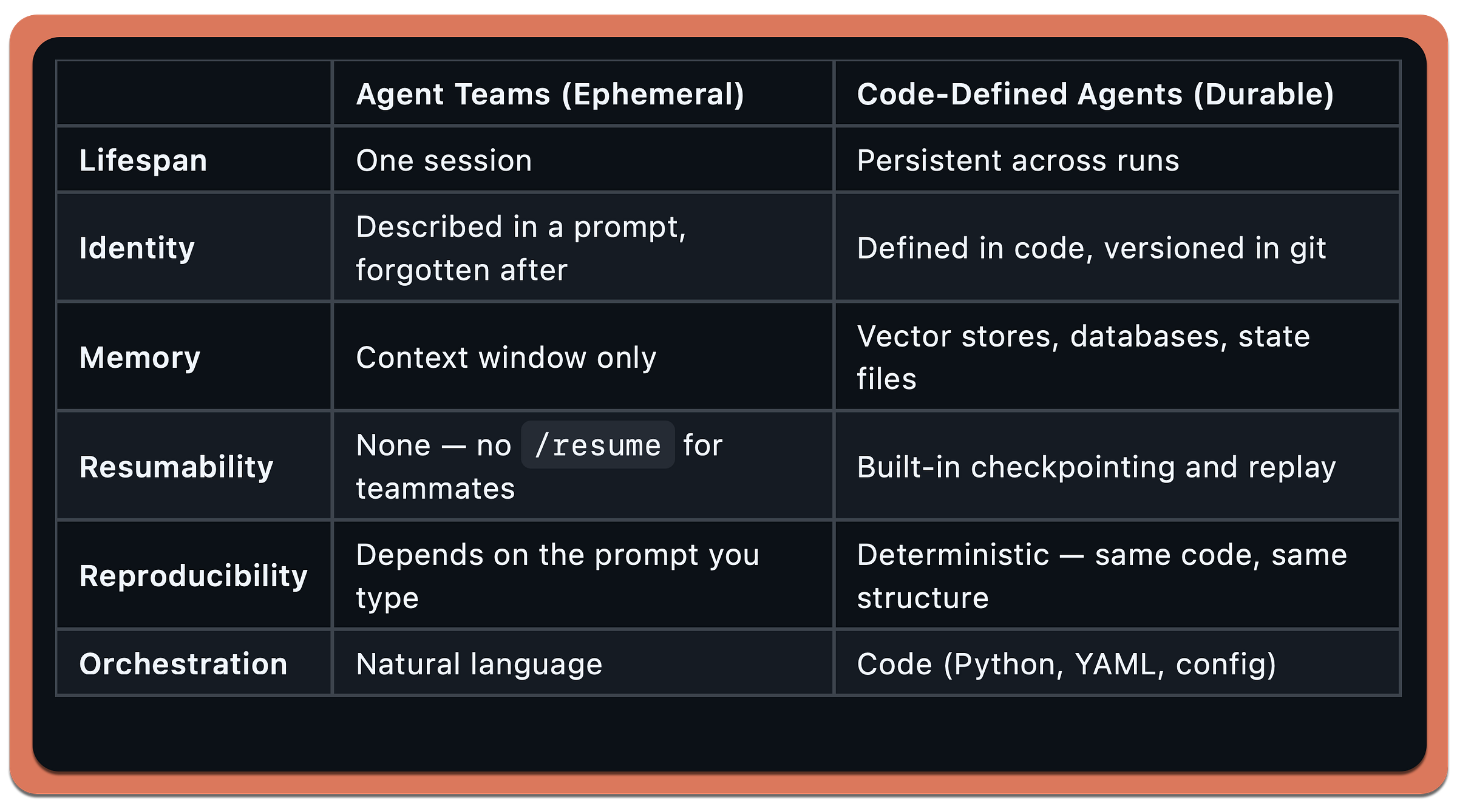
Agent Teams are ephemeral, code-defined agents are durable…in the traditional sense of software…
Agent Teams teammates are ephemeral by design.
They exist for the duration of a session and then they’re gone.
No persistent identity, no memory across sessions, no /resume. You describe a team, it runs, it finishes, it disappears.
Code-defined agents — like what I’ve build with LangGraph, CrewAI, or AutoGen — are the opposite…
Add to this list the idea of sub-agents…
The tradeoff…
Ephemeral agents are fast to create and cheap to experiment with.
You type a prompt, get a team, throw it away.
Perfect for one-off tasks — reviewing a PR, debugging a bug, exploring a codebase.
Durable agents are what you deploy.
When you need the same team structure to run every night against every PR in CI, you don’t want to describe it in natural language each time.
You want it in code, tested, versioned and more deterministic.
Agent Teams sits in the developer workflow space — interactive, exploratory, disposable.
It’s not competing with production agent frameworks.
The first Thing that confused me…
When I first looked at Agent Teams, I assumed each agent would be defined somewhere…a config file, a markdown spec, some kind of schema.
The examples show detailed prompts describing each teammate’s role, responsibilities and file ownership.
It looked like a declarative system.
It’s not.
There is no agent definition file.
The markdown examples are just prompts you paste into Claude Code.
The entire orchestration mechanism is:
One config switch in
settings.jsonthat turns the feature onA natural language prompt that describes the team you want
Claude Code handles the spawning, task management, and messaging.
No YAML.
No agent schema.
No workflow definition.
You describe a team conversationally and Claude Code builds it.
This immediately raised a second question…
If the agents are defined by the prompt, why define them at all?
Why not just say “this PR needs a review, handle it” and let Claude decide what specialists to spawn?
You can.
It works.
But the reason the examples are prescriptive is control…
When you define the agents, you know exactly what’s running and what it costs — each teammate is a separate Claude instance.
You prevent Claude from over-spawning eight teammates when three would do.
You control file ownership.
And you can shape the team dynamic — collaborative, adversarial or independent.
When you let Claude decide, it might under-scope or over-scope.
You lose the ability to set the structure. It’s the same tradeoff as managing a real team. You could say here’s the problem, figure it out.
But more often you want to say I need these three roles, here’s how I want you to coordinate.
In practice there’s a spectrum:
Prescriptive
“Spawn 3 teammates: security, performance, tests”
Guided
“Review this PR with multiple specialists, max 4 teammates”
Open
“This PR needs review. Handle it.”
All three work. Prescriptive for expensive or risky tasks. Open for quick exploratory ones. Once that clicked, the rest of Agent Teams made sense.
Agent Hierarchy
In a previous post I walked through creating custom agentic workflows with Claude Code.
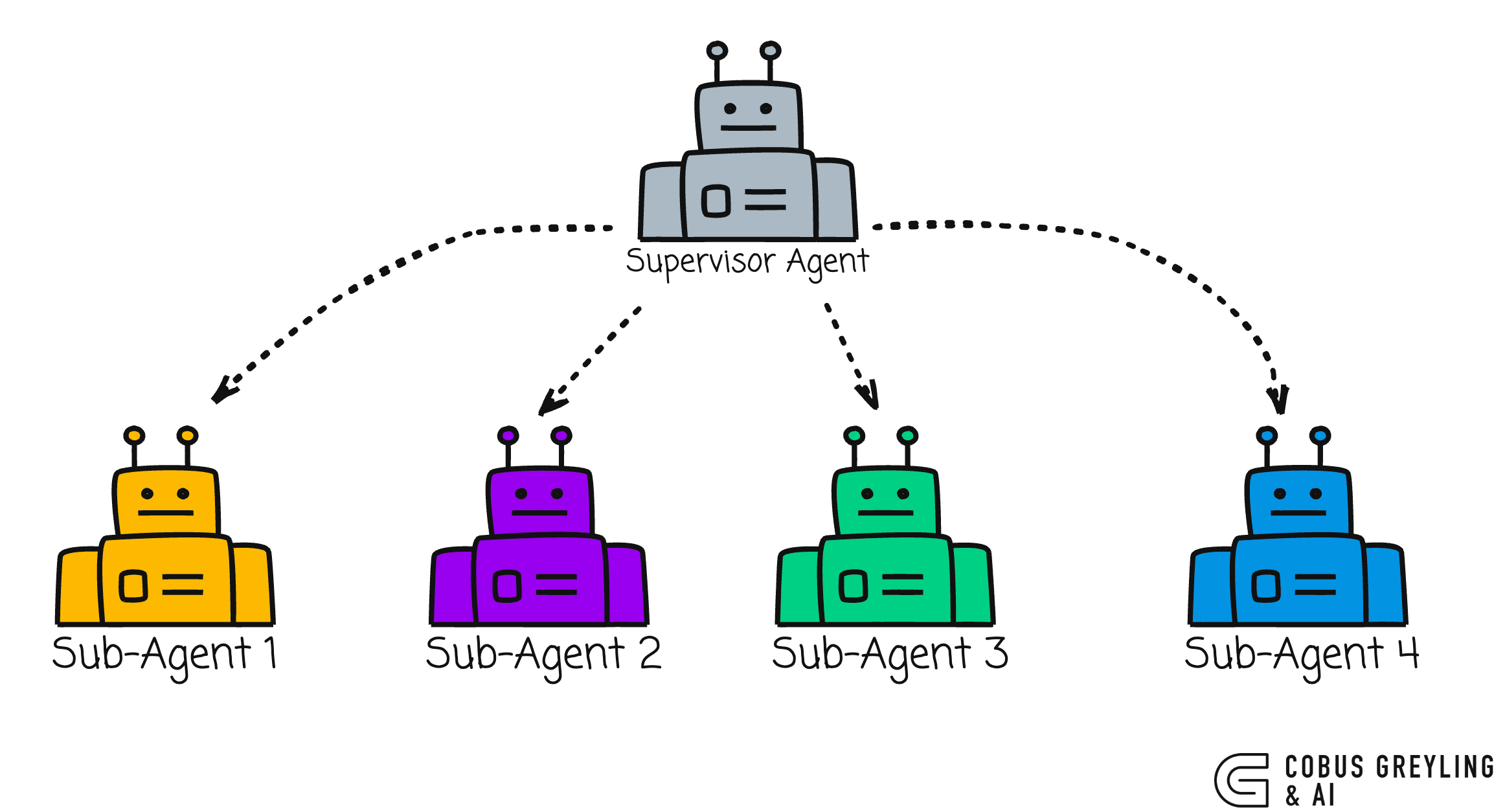
A supervisor agent coordinating specialised subagents for data processing, code generation, documentation and analysis.
That setup demonstrated something important…you could describe the agentic workflow you wanted and Claude Code would create the framework, file structure, code and documentation.
Subagents were a meaningful step forward from single-session prompting.
But they had a constraint.
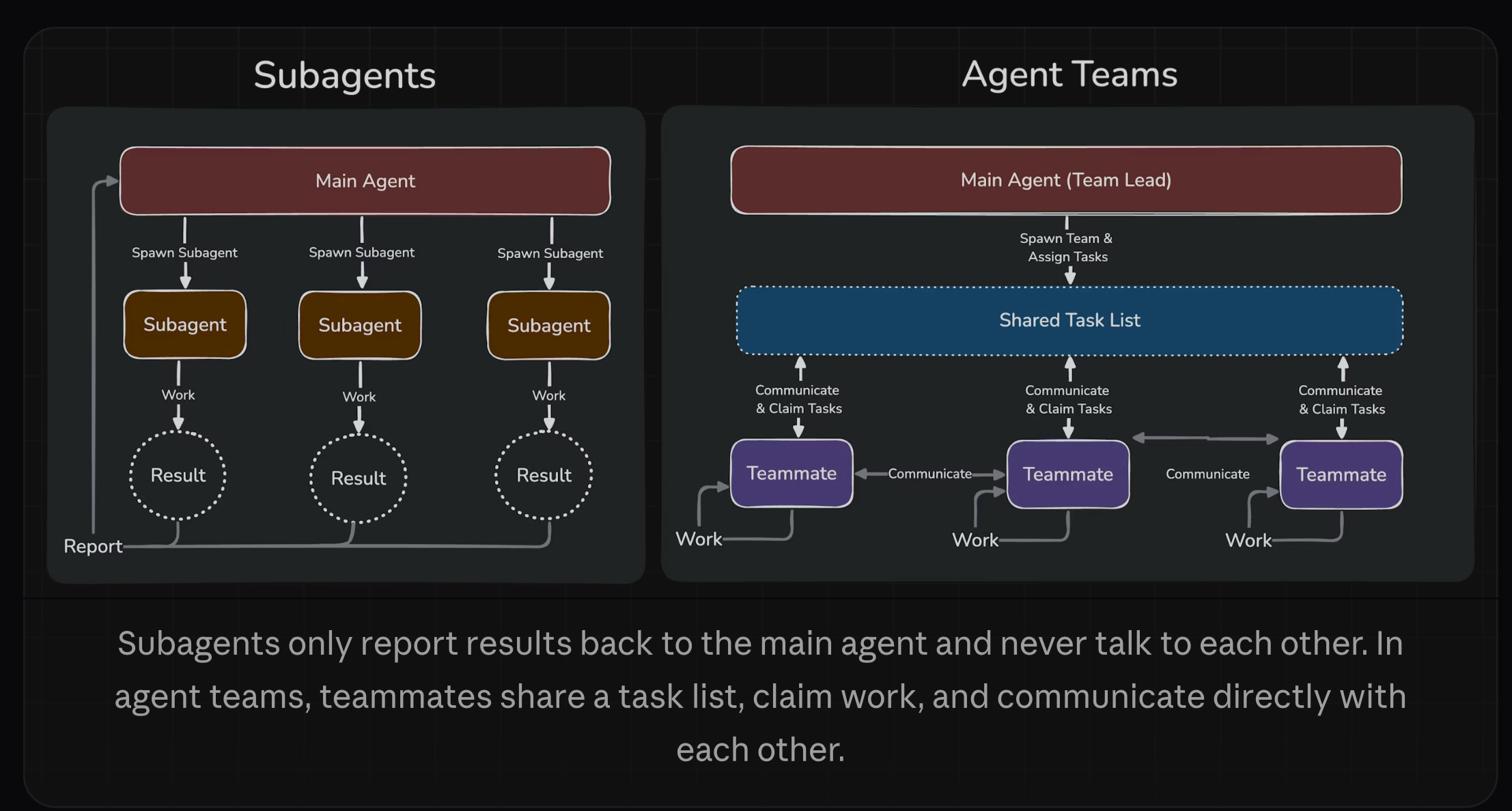
Subagents report results back to the main agent.
They never talk to each other.
If Agent 1 discovers something that Agent 2 needs, the main agent has to relay it.
Every insight routes through one bottleneck.
With the release of Opus 4.6, Anthropic shipped something that removes that bottleneck entirely called Agent Teams.
So I asked myself, what changed?
I wrote about the 5 Levels of AI Agents previously and Anthropic’s own position that coding agents are becoming the universal everything agents.
Agent Teams is the infrastructure that makes universal agents practical.
The difference between subagents and Agent Teams is communication.
Subagents run within a single session. They do focused work and return a result.
They cannot message each other, share discoveries mid-task, or coordinate without the main agent acting as intermediary.
Agent Teams removes that constraint.
Teammates message each other directly. They share a task list. They claim work, coordinate, and even debate each other — all without routing through a lead.
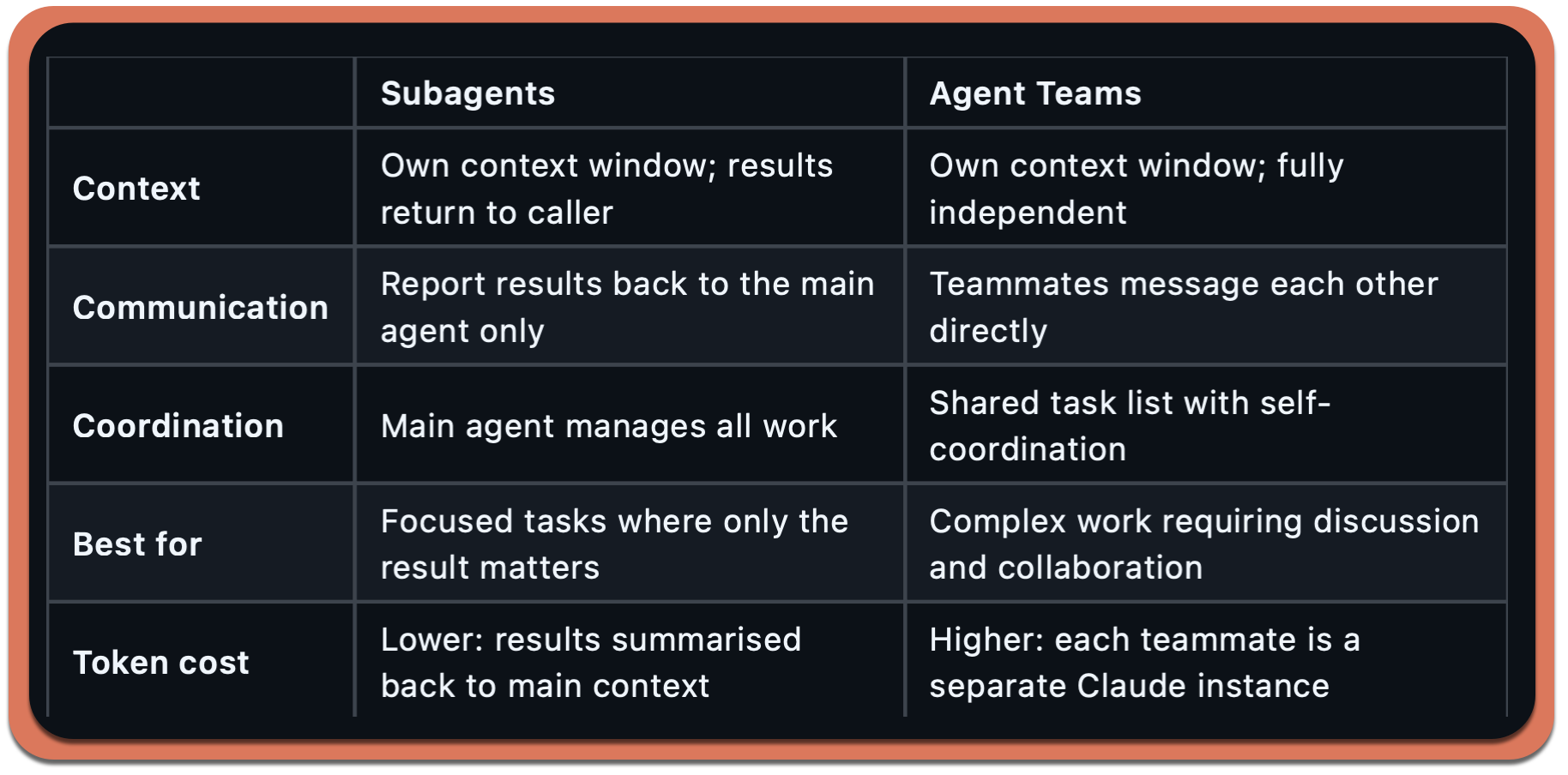
This is important because the most interesting problems are not decomposable into isolated subtasks.
For instance, code review requires cross-referencing security with performance.
Feature implementation requires frontend, backend, and tests to stay in sync.
These are coordination problems and coordination requires communication between workers — not just reporting to a manager.
As I noted when covering the Moltbook studies, AI agents broadcasting without conversing produces shallow outcomes.
Agent Teams is Anthropic’s answer to that exact problem in the development context.
The Architecture
An Agent Team consists of four components:
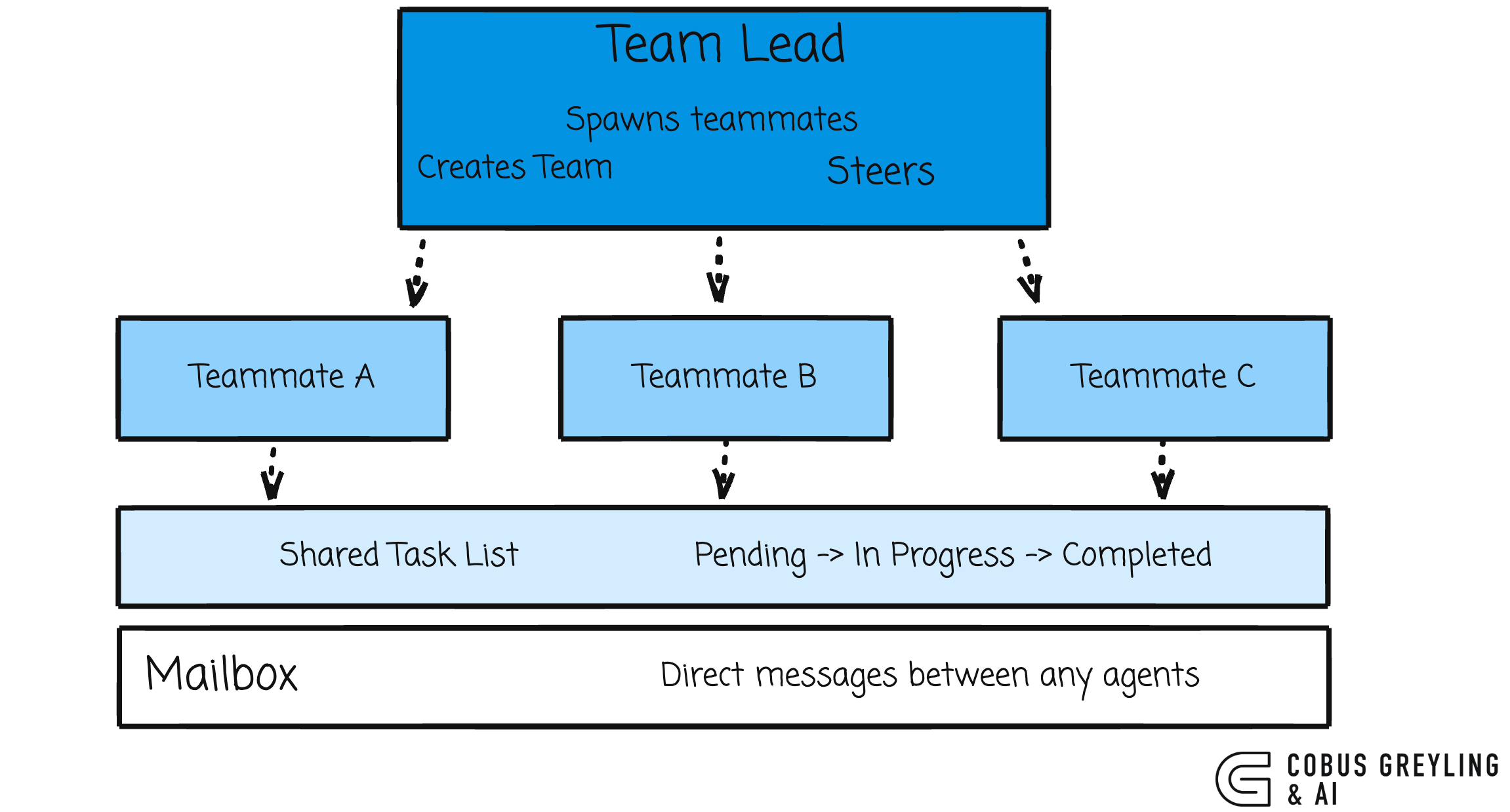
Each teammate is a full, independent Claude Code instance with its own context window.
Teammates load project context automatically, CLAUDE.md, MCP servers, and skills…but they do not inherit the lead’s conversation history.
They start fresh with only the spawn prompt.
Teams and tasks are stored locally:
~/.claude/teams/{team-name}/config.json
~/.claude/tasks/{team-name}/
Task claiming uses file locking to prevent race conditions when multiple teammates try to claim the same task simultaneously.
When a teammate completes a task that others depend on, blocked tasks unblock automatically.
Setting It Up
Agent Teams is experimental and disabled by default. Enable it in your settings.json:
{
  “env”: {
    “CLAUDE_CODE_EXPERIMENTAL_AGENT_TEAMS”: “1”
  }
}Display Modes
You get two options for how teammates appear in your terminal:
In-process (default) — all teammates run inside your main terminal. Use Shift+Down to cycle through them.
Split panes — each teammate gets its own pane. Requires tmux or iTerm2. You see everyone’s output simultaneously.
{
  “teammateMode”: “tmux”
}
Or per-session:
claude --teammate-mode in-processFinally
Markdown down files are so simple, can’t everyone do it? Well, Opus 4.6 was specifically optimised for agentic tool use.
The model isn’t just reading your markdown prompt and generating text. It’s:
Parsing your natural language team description,
Deciding which tools to invoke (TaskCreate, Task with subagent spawning, mailbox messaging),
Managing the coordination loop (checking task status, routing messages, claiming work),
Doing all of this autonomously across multiple turns without you steering each step.
The markdown prompts aren’t a configuration format.
They’re instructions to a model that’s been optimised to act on them autonomously.
The “simplicity” is a capability ceiling that only exists because the model is good enough to replace the orchestration code.
That said, it’s simple until it isn’t.
The ephemeral nature, the lack of reusability, the token cost scaling, those are the current limits of having the model be the framework.
A dedicated framework gives you persistence, determinism and cost control.
Agent Teams gives you speed and zero boilerplate.
The bet Anthropic is making is that the model will keep getting better at orchestration and eventually the framework layer becomes unnecessary for most use cases.

Chief Evangelist @ Kore.ai | I’m passionate about exploring the intersection of AI and language. Language Models, AI Agents, Agentic Apps, Dev Frameworks & Data-Driven Tools shaping tomorrow.

GitHub - cobusgreyling/claude-agent-teams: Claude Code Agent Teams - Multi-agent orchestration from…
Claude Code Agent Teams - Multi-agent orchestration from your terminal (Opus 4.6) - cobusgreyling/claude-agent-teamsgithub.com
Orchestrate teams of Claude Code sessions - Claude Code Docs
Coordinate multiple Claude Code instances working together as a team, with shared tasks, inter-agent messaging, and…code.claude.com
The distinction between subagents and Agent Teams is the key thing here. In practise I find subagents cover 90% of what I need -- context isolation for exploration or verification tasks that report back a summary. Agent Teams are brilliant when you genuinely need lateral coordination, like a frontend agent and a backend agent that need to keep an API contract in sync. But the token costs scale fast since each teammate is a full Claude instance with its own context window. I'd recommend starting with subagents and only reaching for Agent Teams when you hit that coordination bottleneck.
The ephemeral vs. durable distinction is the thing I kept bumping into. I run Claude Code in nightshift mode - agents working while I sleep, orchestrated via CLAUDE.md - and the session-based nature creates real continuity gaps you have to actively work around. Had to build a persistent memory layer just to make it usable across multi-day projects. Codex handles long-horizon work differently, and this was one of the clearest differences after two months of parallel use.
Wrote the full breakdown here: https://thoughts.jock.pl/p/claude-code-vs-codex-real-comparison-2026