Claude Code Hooks
Deterministic Control Over Non-Deterministic AI

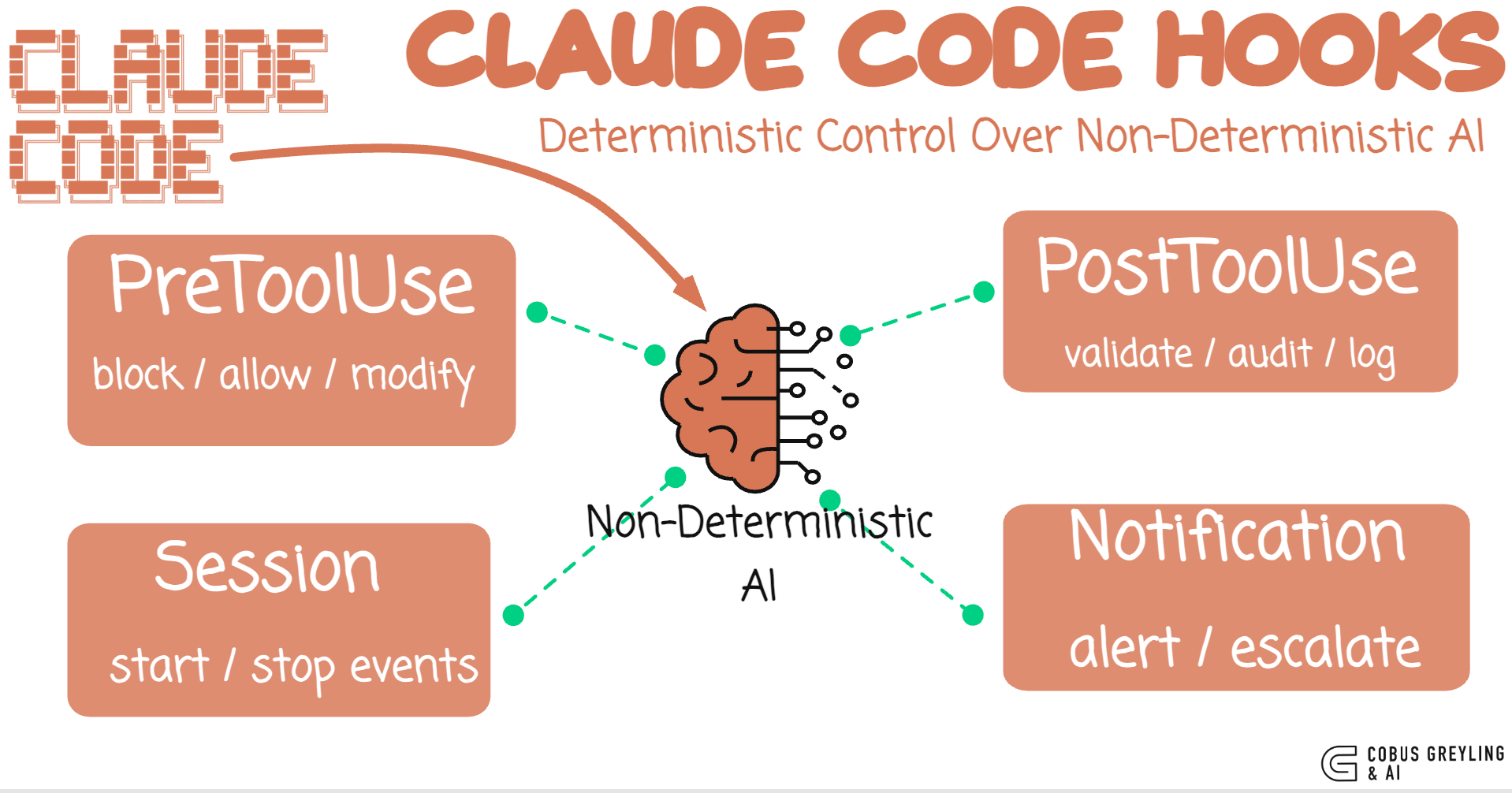
AI agents are largely probabilistic…
They interpret, improvise and sometimes surprise you…
That is what makes them useful.
But It is also what makes them dangerous in production.
The core tension in agentic AI is this… you want the model to be creative and autonomous, but you also want guarantees.
You want it to write code, run commands, edit files … but never touch your .env, never rm -rf /, never publish to npmwithout approval.
Claude Code hooks solve this.
They are not AI. They are not prompts. They are shell scripts that execute at fixed lifecycle points … deterministic control wrapped around non-deterministic AI.
The Problem with prompting for safety
The first instinct when you want an AI agent to avoid something is to put it in the system prompt.
“Do not delete files.”
“Do not modify environment variables.”
“Always ask before pushing to git.”
This works most of the time.
But most of the time is not a guarantee.
Prompts are suggestions.
The model follows them probabilistically.
Under complex multi-step reasoning, edge cases, or adversarial inputs, prompt-based guardrails can fail.
A sufficiently long conversation can dilute the instruction, A novel task framing can route around it. Both these instances were proven in recent studies.
You would not secure a database with a comment that says “please don’t drop tables.”
You write a permission system.
Hooks are the permission system for AI agents.
What Hooks Are
Hooks are shell commands that Claude Code executes at specific lifecycle events.
They run outside the model.
They are not interpreted by the AI.
They are not part of the conversation.
They are deterministic code that fires at predictable moments.
There are four hook types…

The key insight is the PreToolUse hook.
It fires after the AI has decided what tool to call and with what arguments, but before the tool actually runs.
The hook receives the full tool call as JSON on stdin.
You can inspect it, check it against rules, and return a decision … allow, block, or modify.
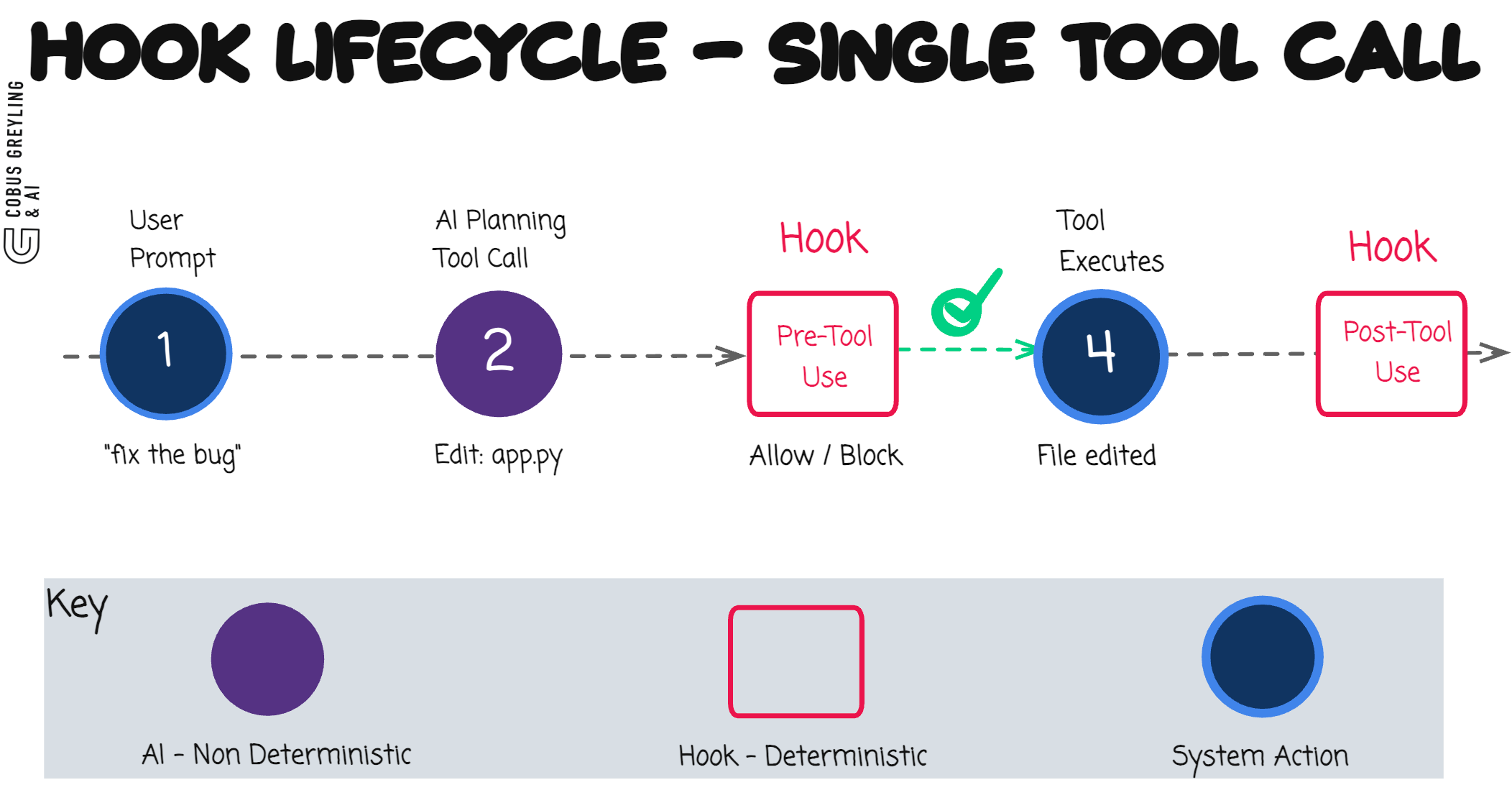
This is not a filter on the model’s output. It is a gate on the model’s actions.
Anatomy of a hook
A hook is any executable … a Python script, a Bash script, a compiled binary.
It receives the tool call context on stdin and communicates decisions through stdout and exit codes.
#!/usr/bin/env python3
“”“Block dangerous Bash commands before they execute.”“”

import json
import sys
import re

BLOCKED_PATTERNS = [
    r”\brm\s+-rf\s+/”,
    r”\bgit\s+push\s+.*--force”,
    r”\bgit\s+reset\s+--hard”,
    r”\bcurl\b.*\|\s*bash”,
    r”\bnpm\s+publish\b”,
]

def main():
    tool_input = json.load(sys.stdin)
    command = tool_input.get(”tool_input”, {}).get(”command”, “”)

    for pattern in BLOCKED_PATTERNS:
        if re.search(pattern, command, re.IGNORECASE):
            result = {
                “decision”: “block”,
                “reason”: f”Blocked: matches dangerous pattern ‘{pattern}’”
            }
            json.dump(result, sys.stdout)
            sys.exit(0)

    # No match — allow the command
    sys.exit(0)

if __name__ == “__main__”:
    main()
When this hook blocks a command, Claude Code sees the reason and adjusts its approach.
It does not retry the blocked command.
It understands that a deterministic boundary has been set and works within it.
Configuration
Hooks are configured in .claude/settings.json at the project level, or in ~/.claude/settings.jsonglobally.
The structure maps hook types to tool matchers to commands:
{
  “hooks”: {
    “PreToolUse”: [
      {
        “matcher”: “Bash”,
        “hooks”: [
          {
            “type”: “command”,
            “command”: “python3 hooks/guard_bash.py”
          }
        ]
      },
      {
        “matcher”: “Edit”,
        “hooks”: [
          {
            “type”: “command”,
            “command”: “python3 hooks/guard_edit.py”
          }
        ]
      }
    ],
    “PostToolUse”: [
      {
        “matcher”: “Bash”,
        “hooks”: [
          {
            “type”: “command”,
            “command”: “python3 hooks/audit_bash.py”
          }
        ]
      }
    ]
  }
}
The matcher field filters which tool triggers the hook. "Bash" fires only for shell commands. "Edit" fires for file edits. An empty string matches everything.
Some practical patterns
Pattern 1: file protection
Prevent edits to lock files, CI configs, and security-sensitive files:
PROTECTED_FILES = [
    “.env”,
    “.env.production”,
    “package-lock.json”,
    “.github/workflows/”,
    “Dockerfile”,
]

PROTECTED_EXTENSIONS = [”.pem”, “.key”, “.cert”]

def guard(tool_input):
    file_path = tool_input.get(”tool_input”, {}).get(”file_path”, “”)
    _, ext = os.path.splitext(file_path)

    if ext in PROTECTED_EXTENSIONS:
        return {”decision”: “block”, “reason”: f”Cannot edit {ext} files”}

    for protected in PROTECTED_FILES:
        if protected in file_path:
            return {”decision”: “block”, “reason”: f”’{protected}’ is protected”}

return None # AllowPattern 2: Audit Trail
Log every action for compliance review:
def audit(tool_input):
    entry = {
        “timestamp”: datetime.now(timezone.utc).isoformat(),
        “tool”: tool_input.get(”tool_name”, “unknown”),
        “command”: tool_input.get(”tool_input”, {}).get(”command”, “”),
        “file”: tool_input.get(”tool_input”, {}).get(”file_path”, “”),
        “session_id”: tool_input.get(”session_id”, “unknown”),
    }
    with open(”audit.jsonl”, “a”) as f:
        f.write(json.dumps(entry) + “\n”)
Every Bash command, every file edit, every tool call — logged as structured JSON. When something goes wrong at 2am, you have a complete record of what the AI agent did, in what order, and why.
Pattern 3: Notification Pipeline
Route Claude Code notifications to Slack, PagerDuty, or any webhook:
import urllib.request

SLACK_WEBHOOK = os.environ.get(”SLACK_WEBHOOK_URL”, “”)

def notify(tool_input):
    message = tool_input.get(”message”, “”)
    title = tool_input.get(”title”, “Claude Code”)

    if SLACK_WEBHOOK:
        payload = json.dumps({”text”: f”*{title}*\n{message}”})
        req = urllib.request.Request(
            SLACK_WEBHOOK,
            data=payload.encode(”utf-8”),
            headers={”Content-Type”: “application/json”},
        )
        urllib.request.urlopen(req)
Now when Claude Code finishes a long task, hits an error, or needs attention, your team gets a Slack message — not just a terminal notification that nobody sees.
Pattern 4: Size Limits
Prevent accidentally large file writes:
MAX_FILE_SIZE = 500_000  # 500KB

def guard_write(tool_input):
    content = tool_input.get(”tool_input”, {}).get(”content”, “”)
    if len(content.encode(”utf-8”)) > MAX_FILE_SIZE:
        size_kb = len(content.encode(”utf-8”)) / 1024
        return {
            “decision”: “block”,
            “reason”: f”File is {size_kb:.0f}KB (limit: {MAX_FILE_SIZE / 1024:.0f}KB)”
        }
return NoneThe Architecture
The mental model is simple:
{ HOOKS } →     AI Agent Logic →    { HOOKS }
deterministic   non-deterministic   deterministic
Before every tool call: deterministic checks.
The AI proposes an action.
Your hooks inspect it against hard rules. Only if the checks pass does the action execute. After execution: deterministic logging, validation, and notification.
The AI operates freely within the boundaries.
It can write any code, run any command, edit any file … as long as it does not cross the lines you have drawn.
When it does cross a line, the block is immediate, deterministic and explained.
The model sees the reason and adapts.
This is not prompt engineering.
It is systems engineering applied to AI agents.
What is the purpose of this…
The industry is moving rapidly from AI-assisted coding to AI-delegated coding.
We are giving agents more autonomy … running them in background loops, letting them execute multi-step workflows, pointing them at entire repositories.
As autonomy increases, the need for hard boundaries increases with it.
You cannot scale AI agent deployments on trust alone.
You need enforcement. You need audit trails.
You need the ability to say “this specific action is not allowed” and have that enforced at the infrastructure level, not the prompt level.
Hooks are that infrastructure. They are the difference between “the AI usually follows the rules” and “the AI cannot break the rules.”
The Pattern
AI creativity inside hard boundaries.
Non-deterministic reasoning wrapped in deterministic control.
The model thinks freely. The hooks enforce absolutely.
Three values were all BitNet needed. A few shell scripts are all you need to make AI agents production-safe.
Chief AI Evangelist @ Kore.ai | I’m passionate about exploring the intersection of AI and language. From Language Models, AI Agents to Agentic Applications, Development Frameworks & Data-Centric Productivity Tools, I share insights and ideas on how these technologies are shaping the future.
Hooks reference - Claude Code Docs
Reference for Claude Code hook events, configuration schema, JSON input/output formats, exit codes, async hooks, HTTP…code.claude.com
COBUS GREYLING
Where AI Meets Language | Language Models, AI Agents, Agentic Applications, Development Frameworks & Data-Centric…www.cobusgreyling.com