CLI vs IDE
The Development Environment Is The Next Layer To Collapse

I have been watching a pattern play out across three layers of the developer stack.
First the integration layer collapsed.
CLI replaced MCP as the most natural interface for AI Agents the bridge already existed, we just had to let agents cross it.
Then the orchestration layer collapsed.
Multi-agent coordination that used to require hundreds of lines of LangGraph or CrewAI became a paragraph of English in a CLAUDE.md file.
Now the development environment itself is collapsing.
The IDE is becoming optional.
The pattern is consistent. The layers keep falling.
What an IDE actually does
Strip away the branding and extensions and an IDE handles five things:
File navigation…find the right file in a large codebase
Code editing…write, modify, refactor
Syntax awareness…highlighting, autocomplete, error detection
Build/run/debug…execute code, inspect state
Version control…commit, branch, push, review diffs
The interface between human and code shifts from visual manipulation to verbal specification.
Every one of those capabilities assumed a human sitting in front of a screen, visually scanning a file tree, reading syntax-highlighted code, clicking through a debugger.
An AI Agent does not need any of that.
What the CLI abstracts away
When I work in Claude Code, here is what the agent does without any visual interface:
The IDE wraps all five capabilities in a visual interface designed for human cognition.
File navigation
grep, find, glob. The agent searches by intent, not by clicking through folders.
It reads the files it needs, skips everything else. No file tree required.
Code editing
The agent reads a file, makes targeted edits, writes it back.
It does not need syntax highlighting to understand the code. The model already parses structure from raw text.
Syntax awareness
The model’s training data contains billions of lines of code.
It catches errors before they happen because it understands the language, not because a red squiggly line told it to look.
The CLI exposes all five as text streams designed for machine cognition.
Build/run/debug
The agent runs commands, reads stdout/stderr, and fixes issues.
No breakpoints, no step-through debugger.
It reads the error, reasons about the cause, and patches the code. One loop.
Version control
The agent sees diffs as text, understands them natively, and writes commit messages that reflect the actual change.
No GUI diff viewer needed.
The inversion
Here is what I find interesting…
The IDE was built to make the command line accessible to humans.
Syntax highlighting exists because raw text is hard for humans to parse.
File trees exist because humans need spatial navigation.
Debuggers exist because humans cannot hold an entire call stack in working memory.
An AI Agent has none of those limitations.
The model parses raw text natively.
It navigates by search, not by spatial memory.
It holds the entire relevant context in its working memory…that is literally what the context window is.
The IDE solves human limitations. The CLI solves none of them because the agent does not have them.
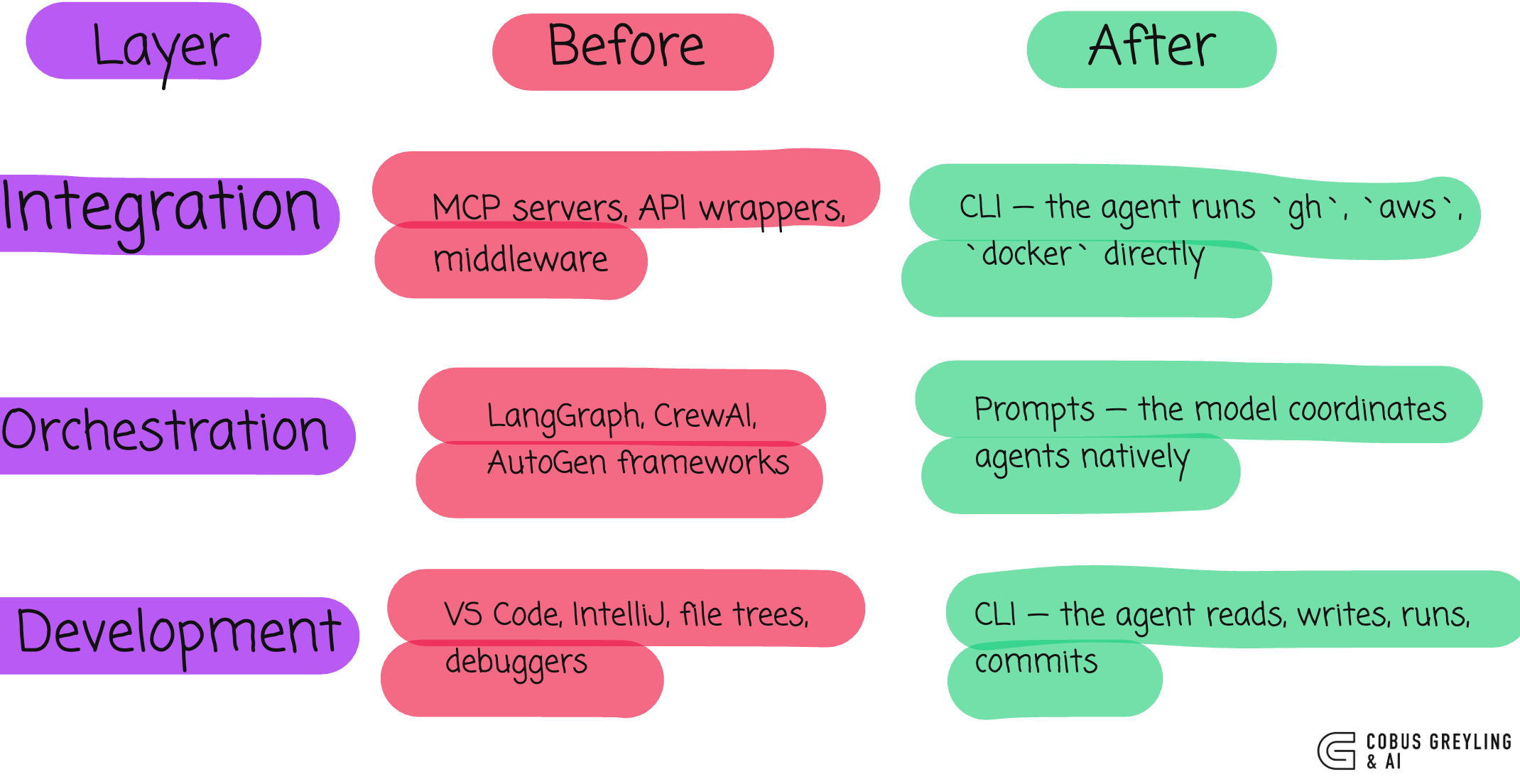
The Same pattern, three times
I keep seeing the same structural collapse:
When the IDE still works
I am not saying IDEs are dead.
Cases where an IDE works well include…
if visual output matters…if you are building a UI and need to see it, you need a browser. The agent cannot evaluate visual design from code alone.
Large-scale refactoring with human judgement…
When the refactor requires architectural decisions that need human review across dozens of files simultaneously, a visual diff tool earns its place.
Onboarding and learning, if you are new to a codebase, the visual structure of an IDE helps build a mental model. An agent already has that model from reading the code.
Also compliance and audit. Some workflows require human eyes on every change. An IDE with approval gates supports that. A CLI transcript also supports it, but the tooling is less mature.
For most day-to-day development work — writing features, fixing bugs, running tests, committing code…the IDE is overhead the agent does not need.
The Developer’s Role Shifts
This changes what being a developer means…
In the IDE era, skill meant knowing the tool. Keyboard shortcuts. Extension ecosystems. Debugger workflows.
In the CLI-agent era, skill means knowing what to ask for.
Describing intent clearly.
Reviewing output critically.
Understanding architecture well enough to guide the agent toward the right solution.
The interface between human and code shifts from visual manipulation to verbal specification.
Where this goes, I think
Each model generation absorbs another layer of developer tooling.
First, autocomplete replaced manual typing (Copilot)
Then, code generation replaced boilerplate (ChatGPT)
Then, agentic coding replaced file-by-file editing (Claude Code, Cursor)
Now, the full development loop — read, write, test, debug, commit, deploy all runs through a text interface
The IDE does not disappear overnight. But its role narrows.
It becomes the review tool, not the creation tool. You open it to inspect what the agent built, not to build it yourself.
The creation happens in the CLI. In a prompt. In plain English.
The development environment collapsed into the model. Just like integration. Just like orchestration.

Chief Evangelist @ Kore.ai | I’m passionate about exploring the intersection of AI and language. Language Models, AI Agents, Agentic Apps, Dev Frameworks & Data-Driven Tools shaping tomorrow.

The collapsing layers pattern is exactly right, and it's showing up in concrete ways. Google shipped gws last week: a Workspace CLI designed explicitly on the assumption the consumer might not be human. Justin Poehnelt (the author) published a post called 'You Need to Rewrite Your CLI for AI Agents' alongside the release, and the design decisions read like a checklist for your post. Raw JSON payloads instead of human-friendly flags, runtime schema introspection, SKILL.md files for composable capabilities.
Wrote up the full architecture here https://reading.sh/google-workspace-finally-has-a-cli-and-its-built-for-agents-5f5fe87d0425 including the Discovery Document-driven command generation. The inversion you describe is the design thesis the whole thing is built on.
Do you reckon the IDE comes back as an orchestration dashboard once multi-agent workflows get complex enough to need visual oversight, or does the terminal absorb that too?