GPT-5.2 Tool Calling
GPT-5.2 supports a number of new features, including more granular management of tools. You are able to run tools in parallel, chain them or create unique collections of tools for specific tasks.

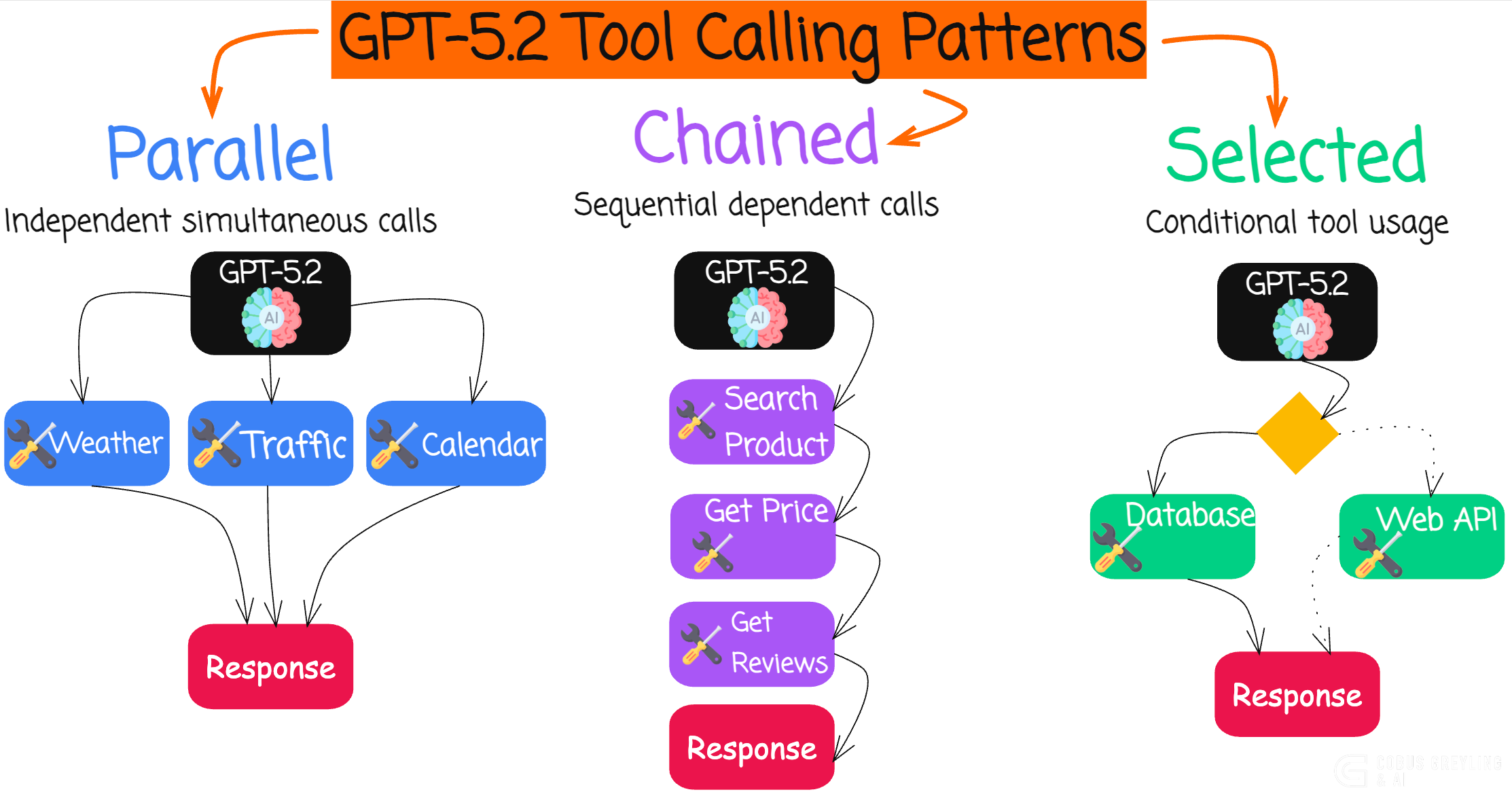
It feels to me that with OpenAI’s GPT-5.2, the concept of tighter coupling between model and runtime is emerging.
Powerful models are equipped with pre-defined tools (functions) which is defined via the SDK. Later in this article I have a complete working example in Python you can copy and paste into Colab.
This seems to be as a pivotal advancement in building more capable AI Agents by creating a thin framework of instructions around the model invocation.
xAI did something similar with their agentic server-side tool/function calling. Where tools are orchestrated in a sequence by the model in a true agentic fashion. For me agentic means that there is a certain level of freedom, agency, the system has.
As agents grow increasingly powerful…
demonstrating superior long-horizon reasoning,
reliable tool-calling, and
end-to-end execution of complex tasks…
I guess the beauty of this approach is that the user defines their tools and the model, by leveraging the OpenAI SDK, plans accordingly.
GPT-5.2 addresses the limitations of previous loosely integrated systems by embedding domain-specific expertise more seamlessly into the core inference process.
This reduces latency, minimises errors in multi-step workflows, and enhances overall reliability.
But it underscores the ongoing need for composable, scalable and portable mechanisms to dynamically infuse specialised knowledge.
All while not compromising flexibility or deployment across diverse environments.
A while back I did an article on the difference between tools and functions as there was a distinct difference between tools and functions.
But over the past months the two terms have been used interchangeably and to some extent merged into one meaning.
Some advantages are…
This approach does offer convenience, scalability and access to the most advanced capabilities.
Including automatic updates, minimal setup and handling of massive infrastructure by the provider — ideal for rapid prototyping, high-performance needs, and teams without dedicated hardware.
Some disadvantages are…
But, it introduces ongoing usage-based costs, potential latency from network calls, dependency on internet connectivity, and privacy concerns since data is sent to external servers.
In contrast, running LLMs locally with frameworks like Ollama, llama.cpp, or vLLM provides superior data privacy, no recurring fees after initial hardware investment.
Also offline operation, lower latency for real-time tasks, and full customisation.
Making it suitable for sensitive applications or cost control at scale.
The downside includes high upfront hardware costs, technical expertise required for setup and maintenance and generally lower raw performance compared to frontier cloud models.
Ultimately, the balance favours cloud for ease and cutting-edge power in most development scenarios, while local shines for privacy-critical or long-term high-volume use — a hybrid approach often emerges as the pragmatic sweet spot in 2025.
Back to tool calling…
Tool calling (also known as function calling) has become one of the most powerful features in large language models like OpenAI’s GPT series.
It allows models to interact with external tools — such as APIs, databases, or custom functions — to retrieve real-time data or perform actions beyond their training knowledge.
While early tool calling was limited to a single function per response, modern models now support chaining (sequential tool calls over multiple turns) and parallel tool calls (multiple independent tools in a single response).
These capabilities dramatically improve agent performance, reduce latency, and enable more sophisticated workflows.
What is Chaining?
Chaining occurs when the model makes one tool call, receives the result, and then decides on the next action based on that output. This is ideal for dependent tasks:
Search for a stock symbol → Fetch its price → Analyze trends → Recommend action.
The process loops: model → tool execution → feed result back → model again. Frontier models like GPT-5.2 excel here, reliably handling dozens of sequential steps without derailing.
What is Parallel Tool Calling?
Parallel tool calling lets the model request multiple independent tools at once in a single response.
For example a user asks for weather in three cities. Instead of three sequential round-trips (slow and token-heavy), the model outputs three tool calls simultaneously. You run them in parallel and return results in one go — cutting latency significantly.
This feature, enabled by default in recent OpenAI models (with parallel_tool_calls=True), shines in scenarios like:
Fetching data from multiple APIs (weather + flights + hotels).
Gathering information from unrelated sources.
Parallelising independent research steps.
Keep in mind the model autonomously decides when to chain tool calls (sequentially, based on results from previous calls) and when to make parallel tool calls (multiple independent calls in a single response).
So the model proactively decides when to use parallel vs. sequential calls, handles complex multi-tool workflows with higher reliability, and reduces failures in long-horizon tasks.
One can describe this as collapsing fragile multi-agent systems into single “mega-agents” with 20+ tools which should be faster, cheaper and easier to maintain. At least initially.
Chaining and parallel tool calls turn LLMs from chatbots into true autonomous agents capable of real-world problem-solving.
Here’s a complete Colab-ready demo below…
Python Demo Showing Parallel Tool Calling
Copy-paste this into a Google Colab notebook to see parallel tool calls live with GPT-5.2…
# Install latest OpenAI library
!pip install --upgrade openai
# Import and set API key (use Colab secrets for security)
from google.colab import userdata
import openai
import json
import timeopenai.api_key = userdata.get(’OPENAI_API_KEY’) # Add your key in Colab Secrets# Define two independent tools
tools = [
{
“type”: “function”,
“function”: {
“name”: “get_current_weather”,
“description”: “Get the current weather for a city”,
“parameters”: {
“type”: “object”,
“properties”: {
“city”: {”type”: “string”, “description”: “City name, e.g. Tokyo”},
“unit”: {”type”: “string”, “enum”: [”celsius”, “fahrenheit”], “default”: “celsius”}
},
“required”: [”city”]
}
}
},
{
“type”: “function”,
“function”: {
“name”: “get_stock_price”,
“description”: “Get the latest stock price for a company”,
“parameters”: {
“type”: “object”,
“properties”: {
“ticker”: {”type”: “string”, “description”: “Stock ticker symbol, e.g. AAPL”}
},
“required”: [”ticker”]
}
}
}
]# Mock tool implementations
def get_current_weather(city: str, unit: str = “celsius”):
# Real implementation would call a weather API
mock_temps = {”Tokyo”: 18, “Paris”: 14, “New York”: 12}
temp = mock_temps.get(city, 20)
return f”{temp}°{unit[0].upper()} in {city} – mostly sunny.”
def get_stock_price(ticker: str):
# Real implementation would call a finance API
mock_prices = {”AAPL”: 228.50, “TSLA”: 412.10, “MSFT”: 415.30}
price = mock_prices.get(ticker.upper(), 100.00)
return f”{ticker.upper()} is currently trading at ${price:.2f}.”# Run the demo
messages = [{”role”: “user”, “content”: “What’s the weather in Tokyo and Paris, and how are AAPL and TSLA stocks doing today?”}]
print(”Sending query to model...\n”)
start_time = time.time()
response = openai.chat.completions.create(
model=”gpt-5.2”, # Excellent at parallel tool calling
messages=messages,
tools=tools,
tool_choice=”auto”,
parallel_tool_calls=True, # Explicitly enable (default in most models)
temperature=0.3
)
response_message = response.choices[0].message
messages.append(response_message)
if response_message.tool_calls:
print(f”Model requested {len(response_message.tool_calls)} parallel tool calls!\n”)
for tool_call in response_message.tool_calls:
name = tool_call.function.name
args = json.loads(tool_call.function.arguments)
print(f”→ Calling {name} with args: {args}”)
if name == “get_current_weather”:
result = get_current_weather(**args)
elif name == “get_stock_price”:
result = get_stock_price(**args)
messages.append({
“role”: “tool”,
“tool_call_id”: tool_call.id,
“name”: name,
“content”: result
})
print(f” Result: {result}\n”)
# Final response with all tool results
final_response = openai.chat.completions.create(
model=”gpt-5.2”,
messages=messages
)
print(”Final synthesized answer:”)
print(final_response.choices[0].message.content)
else:
print(”No tool calls needed.”)
print(response_message.content)
print(f”\nTotal time: {time.time() - start_time:.2f} seconds”)And the output…
# Run the demo
messages = [{”role”: “user”, “content”: “What’s the weather in Tokyo and Paris, and how are AAPL and TSLA stocks doing today?”}]

print(”Sending query to model...\n”)

start_time = time.time()

response = openai.chat.completions.create(
    model=”gpt-5.2”,  # Excellent at parallel tool calling
    messages=messages,
…print(f”\nTotal time: {time.time() - start_time:.2f} seconds”)
Sending query to model...

Model requested 4 parallel tool calls!

→ Calling get_current_weather with args: {’city’: ‘Tokyo’, ‘unit’: ‘celsius’}
   Result: 18°C in Tokyo – mostly sunny.

→ Calling get_current_weather with args: {’city’: ‘Paris’, ‘unit’: ‘celsius’}
   Result: 14°C in Paris – mostly sunny.

→ Calling get_stock_price with args: {’ticker’: ‘AAPL’}
   Result: AAPL is currently trading at $228.50.

→ Calling get_stock_price with args: {’ticker’: ‘TSLA’}
   Result: TSLA is currently trading at $412.10.

Final synthesized answer:
- **Tokyo:** 18 °C, mostly sunny
- **Paris:** 14 °C, mostly sunny

**Stocks (current price):**
- **AAPL:** $228.50
- **TSLA:** $412.10

Total time: 6.10 seconds
Chief Evangelist @ Kore.ai | I’m passionate about exploring the intersection of AI and language. Language Models, AI Agents, Agentic Apps, Dev Frameworks & Data-Driven Tools shaping tomorrow.
https://openai.com/index/introducing-gpt-5-2/