Replace MCP With CLI , The Best AI Agent Interface Already Exists
The Most Powerful Tool Protocol For AI Agents Has Been On Every Unix System Since 1971

I have been thinking about this for a while, and a recent interview with the creator of OpenClaw clarified something I have been observing across the agentic AI landscape.
What if the best interface for AI Agents is not a new protocol at all?
What if it is the command line — the same interface that has been powering software for over fifty years?
The shift that is already happening
As Jensen Huang put it, traditional software is essentially pre-recorded.
Humans write algorithms, define recipes and let the computer execute them.
The output is deterministic and fixed.
”For the first time, we now have a computer that is not pre-recorded but it’s processing in real time.”— Jensen Huang, NVIDIA
This has implications far beyond GPUs.
I really see the software structure collapsing.
The rigid layers of SaaS, APIs, integration platforms, middleware — all of it was built for a world of pre-recorded software.
When processing happens in real time, when an AI Agent can reason about what to do next, the integration layer does not need to be pre-built.
It happens on the fly.
And that is where CLI enters the picture.
MCP, the problem it solves, the overhead it creates
Anthropic’s Model Context Protocol is an important technology.
It standardises how LLMs connect to external tools and data sources. Think of it as a USB-C port for AI…one protocol, many integrations.
But here is the reality on the ground..
Every new integration requires building and maintaining an MCP server.
Each server involves SDKs, schemas, edge case handling, version management.
The ecosystem depends on adoption — the protocol’s value is only as good as the number of available servers.
State management across sessions adds complexity.
MCP solves the right problem.
MCP also supports client-side tool discovery, which reduces some overhead compared to raw API integration.
But the implementation overhead is significant. And for many common tasks, a simpler pattern already exists.
CLI, the interface agents already understand
Here is what makes the command line so compelling for AI Agents..
It already exists.
Every major service ships a CLI.
They are production-grade, battle-tested, and maintained by the service providers themselves.
LLMs are trained on it.
AI models have ingested vast amounts of shell scripts, documentation, man pages, and Stack Overflow answers.
The CLI is deeply embedded in their training data. They know how to use it.
It is self-documenting.
Every CLI tool ships with help. An agent can discover capabilities at runtime without external schema definitions.
It is composable.
The Unix philosophy, small tools that do one thing well, connected through pipes, is exactly how agents should work.
What I find interesting is the inversion.
With MCP, you build the bridge to the tool.
With CLI, the bridge already exists.
The agent just needs permission to cross it.
The Benchmarks Back It Up
A recent benchmark comparing CLI against MCP for browser automation tasks showed:
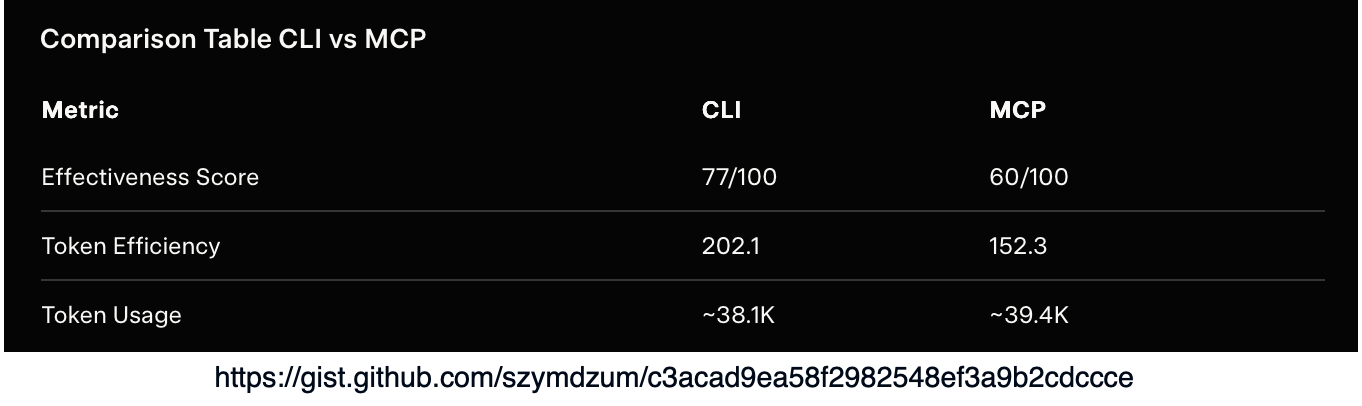
This is structure collapsing
I think what we are witnessing is the collapse of integration infrastructure.
Consider what traditionally sits between an AI system and a service:
Application AI Agent, REST API Client, Authentication Layer, Integration Platform, API Gateway, etc.
Six layers collapse into one.
The agent reasons about the intent, generates the command, and executes it.
No middleware. No integration platform. No pre-built connectors.
This is what Jensen Huang means by real-time processing replacing pre-recorded software.
The integration is not defined ahead of time, it emerges from the agent’s reasoning at the moment it is needed.
SaaS itself starts to look different in this world.
If an AI Agent can interact with any service through its CLI, what is the value of a polished dashboard?
The interface shifts from human-facing UIs to agent-facing command lines.
Part of this is the rise of the meta-agent, think of it as this mediation layer between the human and AI.
Security, the honest trade-off
I should be honest about the trade-offs.
CLI access is powerful, which means it is dangerous.
An agent with shell access has user-level permissions — it can do anything you can do.
MCP arguably has an advantage here, you can restrict what each server exposes.
With CLI, you need to enforce boundaries differently…as I have alluded in a previous post:
Command whitelisting, only allow specific tools
Sandboxing, run CLI commands inside containers
Human-in-the-loop, require approval for critical operations
Audit logging, track every command the agent runs (inspectability, observability, discoverability)
Both require deliberate engineering.
When to use what
This is not an either-or debate. It is a spectrum…
The decision framework is simple: if a CLI exists and the model knows it, use it.
Build an MCP server only when you must.
Lastly
The best agent interface was never going to be a new protocol.
It was always going to be the one that every tool already speaks.
The humble command line is proving to be the most robust, universal and battle-tested way for agents to interact with the world.
Basic example application architecture:
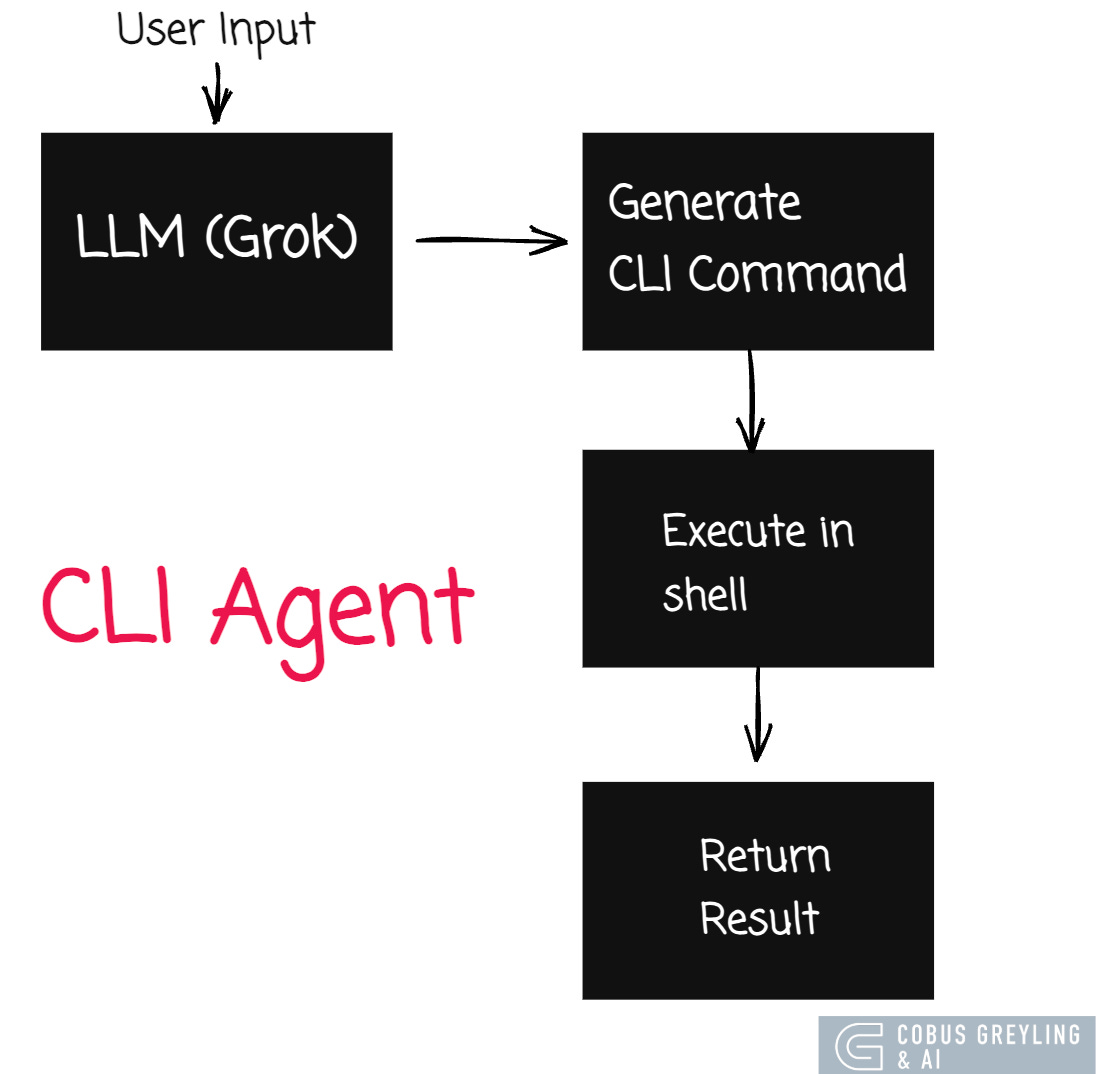
Working code example:
“”“
CLI Agent MVP — Replace MCP With CLI
=====================================

This demonstrates an AI Agent that uses CLI tools directly
instead of MCP servers.

The agent reasons about what to do,
generates shell commands,
executes them
and interprets results.

No MCP servers.
No SDKs.
No schemas.
Just an LLM + the command line.


Requirements:

pip install openai
GROK_API_KEY must be set or in ~/.grok/user-settings.json

Usage:
python3 cli_agent_demo.py
“”“

import json
import os
import subprocess

from openai import OpenAI


# --- Configuration ---

def get_api_key():
    key = os.environ.get(”GROK_API_KEY”)
    if key:
        return key
    settings_path = os.path.expanduser(”~/.grok/user-settings.json”)
    if os.path.exists(settings_path):
        with open(settings_path) as f:
            return json.load(f).get(”apiKey”)
    raise ValueError(”Set GROK_API_KEY or add apiKey to ~/.grok/user-settings.json”)


client = OpenAI(
    api_key=get_api_key(),
    base_url=”https://api.x.ai/v1”,
)

# --- Allowed CLI tools (security whitelist) ---

ALLOWED_COMMANDS = {”git”, “ls”, “cat”, “wc”, “head”, “tail”, “find”, “grep”,
                    “echo”, “date”, “whoami”, “uname”, “python3”, “pip3”,
                    “which”, “file”, “du”, “df”, “ps”, “uptime”, “sw_vers”,
                    “sort”, “awk”, “sed”, “cut”, “tr”, “uniq”, “xargs”, “jq”,
                    “curl”}

SYSTEM_PROMPT = “”“You are a CLI Agent. You accomplish tasks by executing shell commands.

RULES:
1. When you need information or want to perform an action, respond with a
   shell command inside a ```bash code block.
2. Only use ONE command per response (you can use pipes).
3. After seeing the command output, interpret the results for the user.
4. If no command is needed, just respond normally.
5. You are running on macOS. Available tools: git, ls, cat, wc, head, tail,
   find, grep, echo, date, whoami, uname, python3, pip3, which, file, du, df,
   ps, uptime, sw_vers.
6. Do NOT use sudo or rm. Do NOT modify or delete files.
7. Be concise. Explain what the command does and what the output means.
“”“


def extract_command(response_text: str) -> str | None:
    “”“Extract a bash command from the LLM response.”“”
    if “```bash” not in response_text:
        return None
    start = response_text.index(”```bash”) + len(”```bash”)
    end = response_text.index(”```”, start)
    return response_text[start:end].strip()


def is_command_allowed(command: str) -> bool:
    “”“Check if the command’s base tool is in the whitelist.”“”
    base_cmd = command.strip().split()[0]
    # Handle pipes — check all commands in the pipeline
    parts = command.split(”|”)
    for part in parts:
        cmd = part.strip().split()[0]
        if cmd not in ALLOWED_COMMANDS:
            return False
    return True


def execute_command(command: str, timeout: int = 15) -> str:
    “”“Execute a shell command and return output.”“”
    try:
        result = subprocess.run(
            command,
            shell=True,
            capture_output=True,
            text=True,
            timeout=timeout,
        )
        output = result.stdout
        if result.stderr:
            output += f”\n[stderr]: {result.stderr}”
        if result.returncode != 0:
            output += f”\n[exit code]: {result.returncode}”
        return output.strip() or “(no output)”
    except subprocess.TimeoutExpired:
        return “[error]: Command timed out after 15 seconds”


def run_agent(user_prompt: str) -> None:
    “”“Run the CLI agent for a single user prompt.”“”
    messages = [
        {”role”: “system”, “content”: SYSTEM_PROMPT},
        {”role”: “user”, “content”: user_prompt},
    ]

    max_rounds = 5  # Prevent infinite loops

    for round_num in range(max_rounds):
        # Get LLM response
        response = client.chat.completions.create(
            model=”grok-3-fast”,
            messages=messages,
            temperature=0.3,
        )

        assistant_msg = response.choices[0].message.content
        messages.append({”role”: “assistant”, “content”: assistant_msg})

        # Check if the response contains a command
        command = extract_command(assistant_msg)

        if command is None:
            # No command — this is the final answer
            print(f”\nAgent: {assistant_msg}”)
            return

        # Validate command
        if not is_command_allowed(command):
            print(f”\n  [BLOCKED] Command not in whitelist: {command}”)
            messages.append({
                “role”: “user”,
                “content”: f”That command is not allowed. Only these tools are permitted: {’, ‘.join(sorted(ALLOWED_COMMANDS))}. Try a different approach.”,
            })
            continue

        # Execute command
        print(f”\n  $ {command}”)
        output = execute_command(command)
        print(f”  {output[:500]}”)

        # Feed output back to the LLM
        messages.append({
            “role”: “user”,
            “content”: f”Command output:\n```\n{output}\n```\nInterpret this result for the user.”,
        })

    print(”\nAgent: (max rounds reached)”)


# --- Demo ---

SEPARATOR = “=” * 60

DEMOS = [
    “What operating system and hardware am I running on?”,
    “How many Python files are in the current directory and its subdirectories?”,
    “Show me the 5 largest files in the current directory tree.”,
    “What is today’s date, who am I logged in as, and how long has this machine been running?”,
]


def main():
    print(SEPARATOR)
    print(”  CLI Agent MVP — No MCP, Just Shell Commands”)
    print(”  LLM: Grok 3 Fast  |  Interface: CLI tools”)
    print(SEPARATOR)

    for i, prompt in enumerate(DEMOS, 1):
        print(f”\n{’─’ * 60}”)
        print(f”  Demo {i}: {prompt}”)
        print(f”{’─’ * 60}”)
        run_agent(prompt)

    print(f”\n{SEPARATOR}”)
    print(”  Done. The agent used CLI tools directly — no MCP servers.”)
    print(SEPARATOR)


if __name__ == “__main__”:
    main()
Chief Evangelist @ Kore.ai | I’m passionate about exploring the intersection of AI and language. Language Models, AI Agents, Agentic Apps, Dev Frameworks & Data-Driven Tools shaping tomorrow.

COBUS GREYLING
Where AI Meets Language | Language Models, AI Agents, Agentic Applications, Development Frameworks & Data-Centric…www.cobusgreyling.com
The software structure collapsing idea resonates beyond AI agents too. On the maintenance side, one open-source CLI (Mole) now replaces four paid Mac apps I used to run. Six commands, zero subscription, entire thing is readable shell scripts. Same pattern you're describing: the simple tool that already exists beats the complex one that needs to be built. Covered it here: https://reading.sh/the-best-mac-cleaner-costs-nothing-and-lives-in-your-terminal-43fe1e5245e3?sk=9920cc175ebaaf5e9ef1ffd9c32b4a31